
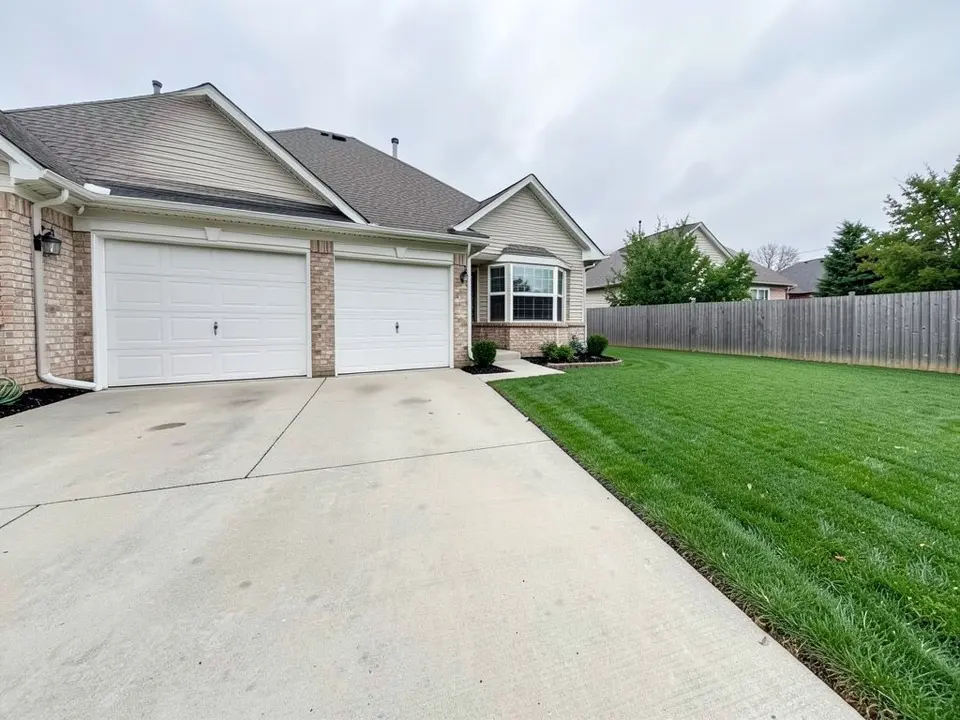
Start with what the driveway has to do
These ideas come from Family Handyman (updated July 29, 2025), brick&batten (a design firm, January 19, 2024) and YardShare (April 9, 2026). They are design advice, not tested in any climate, so check plants against your own growing zone.
- Treat the drive as part of the front yard: YardShare says borders and planting beside the drive define where the pavement starts and stops so it does not flatten the front. If the driveway dominates, it suggests improving the edges first.
- Solve slope and runoff first: YardShare says to use retaining walls, planting or ground cover to control the grade where the driveway edge is sloped or eroding, before adding decorative touches. Family Handyman plans for drainage too: an example uses river rock as a dry creek bed on low ground to channel rainwater.
- Snow, in cold climates: Family Handyman asks, for the North, whether there is a place to shovel or blow snow, and says to address drainage wherever you live.
Planting beds and pockets beside the drive
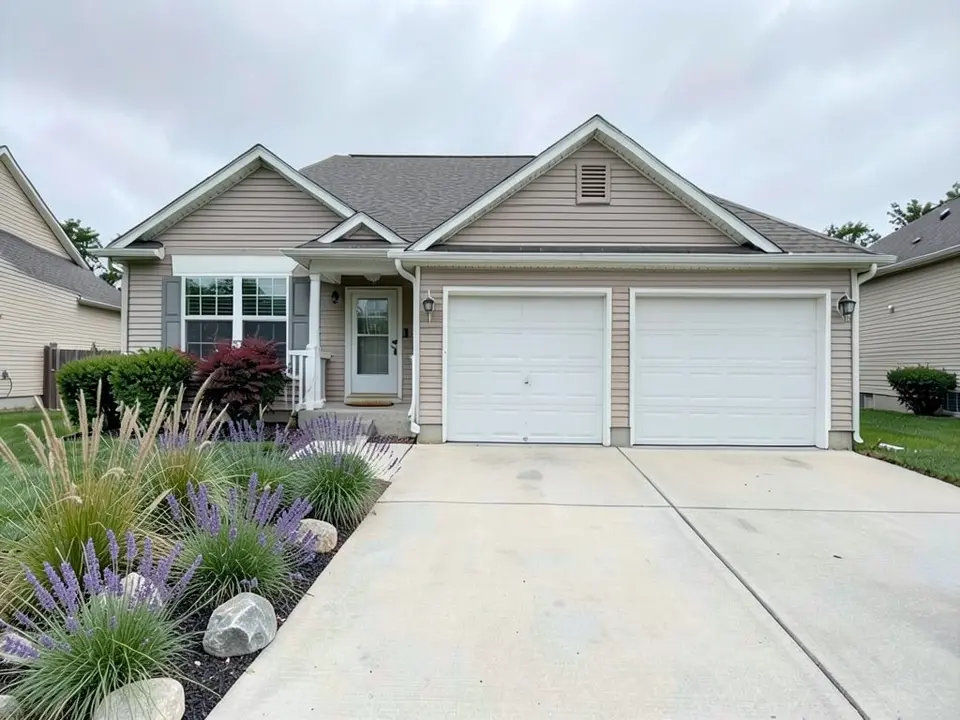
Our first example is this idea. You do not have to landscape the whole length.
- A planting pocket: Family Handyman says it can be any size or shape, as long as there is room for the roots, and that plants should be chosen by their mature size. Its example is a dwarf blue spruce.
- One bed, then add: YardShare suggests starting with one bed: a clear bed line, a consistent plant palette and one focal point near the walkway or entry, rather than a full hardscape rebuild.
- Repeat the plants: brick&batten suggests repeating the same plant mix for cohesion, and using matching planter groups on each side of the garage.
- Groundcover: Family Handyman suggests creeping euonymus or periwinkle inside a circular drive.
- Color from the street: Family Handyman says annuals planted in batches give strong color visible from the street, and can be changed each year.
- A lavender look: Family Handyman's country-garden example pairs a gravel drive with lavender mounds, which is close to the lavender in our first example.
- Large containers: Family Handyman says to place them where they will not interfere with vehicles, and to repeat colors and shapes for a cohesive look.
Hedges and tree lines
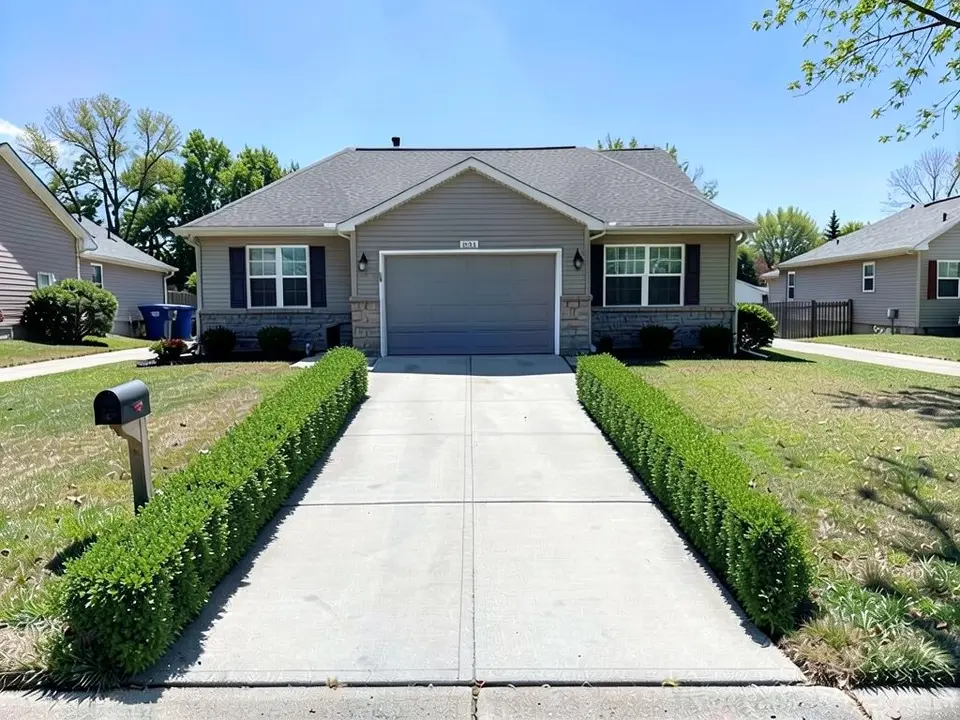
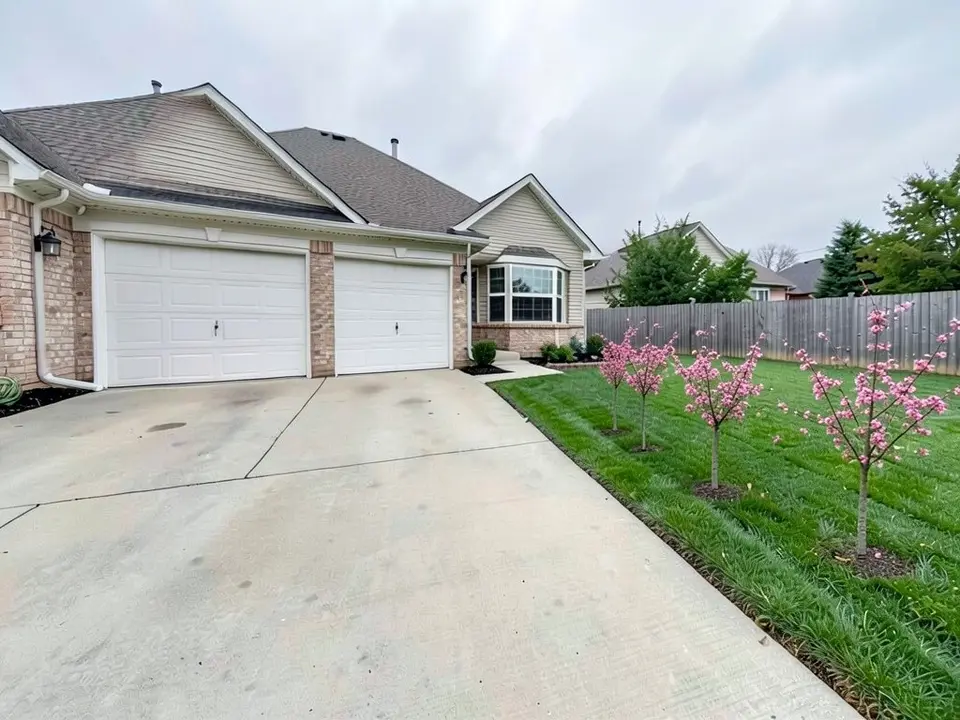
Our second and third examples are these two ideas.
- Boxwood hedge: Family Handyman says a formal boxwood hedge around a circular drive keeps cars from getting too close, and that slow-growing boxwood and low, sheared hedges keep upkeep low. brick&batten suggests bordering the drive with lush greenery to frame it, especially against a light-colored house.
- Matching trees: Family Handyman describes lining the drive with matching trees lit by landscape lighting, pruned for shape and to keep the view clear when vehicles back out.
- Rocks as a barrier: Family Handyman says rocks stop cars from rolling into gardens, and that a matching rock mulch unifies the bed.
- A circular drive: Family Handyman notes it avoids backing up, and brick&batten suggests a landscaped island in the middle, poured around, or a fountain surrounded by plants and rocks.
Materials, parking and the walkway
The pages agree on one point: repeat a few materials so the drive, walkway and entry read as one design.
- Repeat materials and lighting: YardShare suggests carrying brick, stone, light fixtures or border shapes from the driveway through the walkway to the front entry. brick&batten says repeating plants and materials creates a cohesive look.
- Separate the drive from the walkway: brick&batten suggests landscaping between them and using a different paver for each.
- Contrast: brick&batten describes spaced pavers with darker stone, and pea stone, shrubs and a paver path linking the drive to the walkway, with wood planters at the entrance.
- Extra parking: Family Handyman suggests landscaping only the front-facing side and leaving the other side as gravel for extra parking so cars do not block the garage. We tried to draw a gravel parking pad beside the drive three times, with two seeds and two wordings, and each time the model painted the concrete driveway itself grey instead, so we do not show it. The AI is not a good guide to where a gravel pad would go.
Lighting along the drive
brick&batten suggests lining curved drive edges with stone and plants, with in-ground lights between them, which it says looks good at night and helps drivers keep their tires on the pavement and out of the grass. Family Handyman pairs landscape lighting with its row of matching trees. For more, see our landscape lighting design ideas page.
What these pages do not cover
None of the three pages gives a setback rule, a sight-line standard or a safety distance. Family Handyman only says to prune trees so they do not block the view when backing out, and none of the pages covers snow plow clearance or turning radius. Rules about how close a hedge or tree may stand to a driveway and the street differ by city, so ask your city or county before you plant, and treat our pictures as the look only.
How to try an idea on your own driveway photo
Use Custom mode for this. The Yard Redesign styles have no text box, so you cannot ask for a particular bed, hedge or row of trees there. Custom lets you name the strip, the plants and what must stay the same.
- Take the photo in daylight from the street or the end of the driveway, with the garage, the drive and the lawn beside it in frame.
- Open the landscape tool and sign in with Google or an email code. You get 1 free render with a free account.
- Under Select Landscape Mode, pick Custom.
- In the Custom Design Requirements box, name the strip you want changed, the plants, and what must stay the same, such as the house, the garage doors, the driveway and the camera angle.
- Upload your photo under Upload Your Garden Image and click Generate Custom Design.
- Compare the result with your photo and change one thing at a time, such as the plants or how many trees, and run it again.
What the AI can and cannot do
The AI shows a look: roughly how a bed, a hedge or some trees would sit beside your own drive, in the plants and colors you name. That helps you choose and explain what you want to a landscaper.
It does not measure the drive, check drainage or slope, pick plants for your climate, size a tree for its root space, check sight lines, or price the job. It also does not always follow the instruction, as the uneven tree spacing and the failed gravel pad show. Treat the result as a picture of an idea and get the plan from a local professional.
Driveway instructions to paste into Custom mode
These are the exact instructions we used for the three examples above, in the same order. In the landscape tool, choose Custom, paste one into the Custom Design Requirements box, then upload your photo. Swap in your own plants, the part of the driveway you want changed and what must stay.
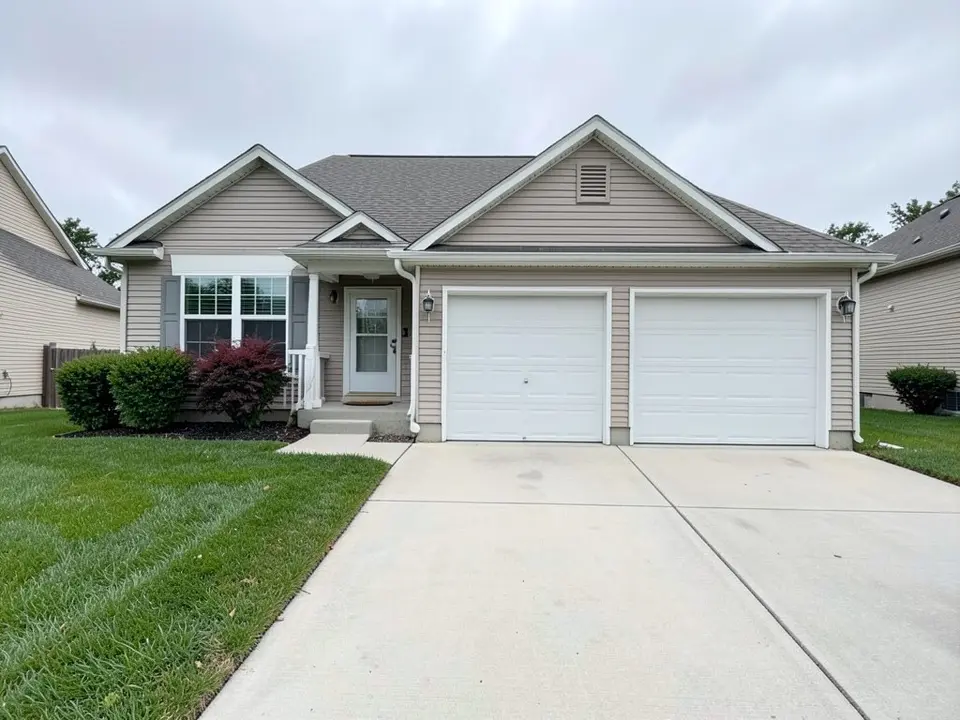
- Change ONLY the strip of lawn along the left side of the driveway: replace it with a planting bed of ornamental grasses and purple lavender with a few grey boulders. Keep the house, the garage doors, the driveway and the camera angle exactly the same.
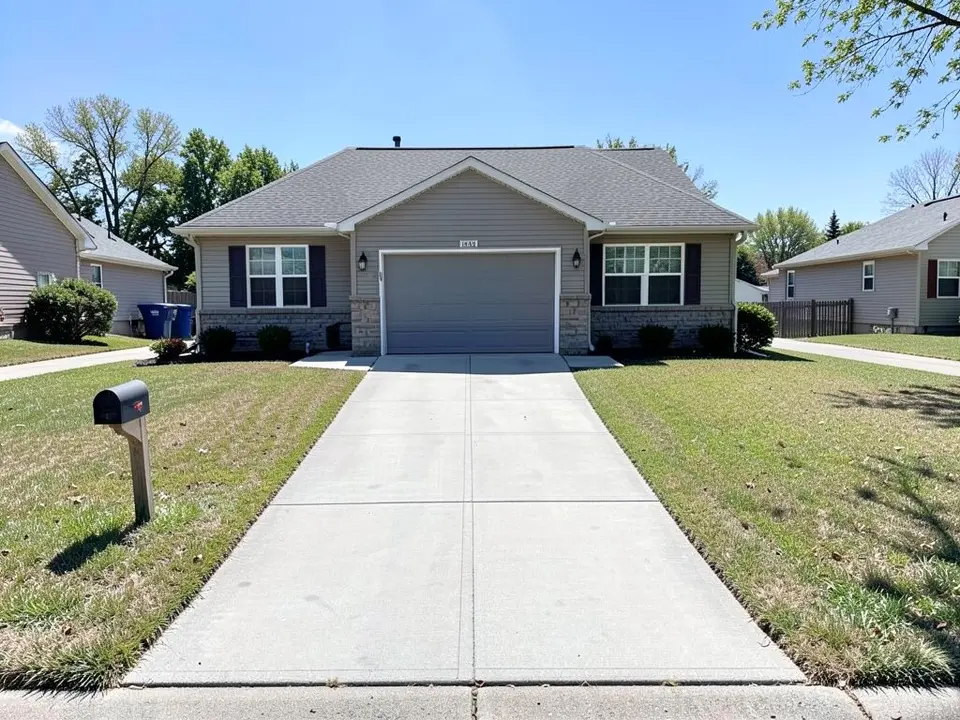
- Change ONLY the sides of the driveway: add a low clipped green boxwood hedge along both sides of the driveway. Keep the house, the garage door, the driveway, the lawn, the mailbox and the camera angle exactly the same.
- Change ONLY the lawn to the right of the driveway: plant a row of three small young flowering trees with pink blossoms spaced evenly along the edge of the lawn next to the driveway. Keep the house, the garage doors, the driveway, the fence, the rest of the lawn and the camera angle exactly the same.
Frequently asked questions
What are good driveway landscaping ideas?
The pages we read suggest a planting bed or pocket beside the drive, a boxwood hedge, a row of matching trees, repeating materials from the drive to the entry, and lighting along the edges. The examples above show the first three on a photo.
Should I fix slope and drainage before I plant?
YardShare says to control a sloped or eroding driveway edge with retaining walls, planting or ground cover before adding decorative touches, and Family Handyman plans for drainage and, in cold climates, snow storage. Ask a local professional about your own ground.
How do I keep plants safe from cars?
Family Handyman suggests a formal boxwood hedge to keep cars from getting too close, rocks to stop cars rolling into gardens, and large containers placed where they will not interfere with vehicles.
Can your tool tell me if trees will block my view when I back out?
No. Family Handyman only says to prune trees so they do not block the view, and none of the pages gives a sight-line standard. A picture has no scale for that. Check with your city or a local professional.
Can the tool draw a gravel parking pad beside my driveway?
Not reliably. We tried three times and each time it painted the concrete driveway itself grey instead of adding gravel on the lawn, so we do not show it. Describe the pad to a contractor in words.
Is this the same as your front walkway page?
No. This page is about the driveway and the strip beside it. For the path from the driveway to the front door see our front walkway landscaping ideas.
Do I need an account, and is it free?
You need an account, and it is free: 1 free render with a free account, and free renders carry a watermark. More renders and no watermark come with a paid plan.
Sources
The facts above come from these pages, which we read in October 2026. We are not affiliated with any of them.