
What Yardzen is, according to Yardzen
Per yardzen.com on 2026-10-15, Yardzen's FAQ describes an all-online design process: you share photos and videos of your outdoor space, answer questions and take a style quiz, and its designers, using that material plus technology and data, design the space without visiting your property. Its FAQ says that after the design it can connect you with a local, vetted contractor who can install it, and that you are not locked into using its builders. Its packages page says it helps you source bids to build the design in select markets, and that you own your designs.
Yardzen's own pages differ on timing, per yardzen.com on 2026-10-15. Its packages page says you receive designs "within 5-10 days". One FAQ answer says it aims to deliver your first design within 5-10 business days; another says you can have first draft designs within about a week of giving the team what it needs; and its process answer, for packages with 3D renders, describes a house model about a week after you submit your materials and the first draft renders three to four weeks after that. We cannot tell which applies to which package, so ask Yardzen for the current timeline for the one you want.
Yardzen's packages, per yardzen.com on 2026-10-15
These are the backyard packages and the Premium package per yardzen.com on 2026-10-15. Prices change, and front yard, full yard and small space packages are listed separately on its site, so check there before you decide.
| Package | Price shown | What Yardzen says it includes |
|---|---|---|
| Essential | $995 | A plan for the backyard and side yards at its most accessible price; its comparison table lists no revisions. |
| Classic | $1,395 | A guided design with photorealistic renders and dedicated project management, for the backyard and side yards; its comparison table lists 1 revision. |
| Signature | $1,995 | Day-to-night renders and a cost advisor, for the whole backyard and side yards; its comparison table lists 2 revisions. |
| Premium | $3,495 | A landscaping plan for the entire property, exterior design (paint, windows, doors), a Master designer, a kickoff and review call and 3 rounds of revisions (its FAQ says 2; see below). |
Yardzen's FAQ says extra revisions cost $295. Its pages disagree on revisions, so we are not picking one: its packages page and Premium page say Premium has 3 rounds, its FAQ says 2; its comparison table lists no revisions for Essential, while its FAQ says every package comes with at least one round. For Premium, its packages page says a Master designer and its FAQ says Principal Designers. Confirm each with Yardzen before buying. Yardzen's home page shows a 4.8 rating from 19,699 reviews; that is its own figure, which we have not checked.
Yardzen and an AI preview side by side
The Yardzen column is what yardzen.com says. The AI preview column is our tool as it works today.
| Yardzen (a design service) | AI preview on your photo (this tool) | |
|---|---|---|
| What you get | A designer's plan for your property, with renders, a plant, material and furniture list and, in some packages, 2D CAD plans. | One edited picture of your own photo per run, showing the look you describe. No plan, no plant list, no measurements. |
| Who designs it | Yardzen's designers, working from your photos and videos. | An AI model following your written instruction. You decide, and you can run it again. |
| What it costs | Backyard packages $995 to $1,995 and a $3,495 Premium package, per yardzen.com on 2026-10-15; its front yard, full yard and small space packages are priced separately. | 1 free render with a free account (with a watermark); weekly plans from $6.99 per week as shown on our pricing page on 2026-10-15, with monthly and yearly plans also listed there. |
| Getting it built | Says it can connect you with vetted contractors in select markets. | Does not. You take the picture to a contractor or build it yourself. |
| Best for | A full, build-ready plan from a professional. | Seeing ideas on your own yard quickly, comparing options and briefing a designer or contractor. |
When Yardzen is the better choice
If you want a designer to plan the whole yard to scale, a plant and materials list, drawings a contractor can price from, and help finding builders, that is what a design service is for and our AI picture does not replace it. An AI render does not measure your property, check drainage, grading or local rules, or tell you what a project will cost.
When an AI preview is enough, and how to use both
An AI preview helps when you are still deciding: should the patio go near the house or the fence, would a gravel path or pavers suit the front, how would planting beds change the look of the lawn. It is also useful before you pay anyone. A few pictures of what you like give a designer, whether at a service or a local firm, something concrete to react to, and they cost far less than a revision round.
Some people use it to narrow ideas before buying a package, and some use it on its own for a small project. Neither is a reason to skip a professional on a big or complicated yard.
How to try an idea on your own photo
Use Custom mode. The Yard Redesign styles have no text box, so you cannot name a patio, a path or a sitting area there. Custom lets you describe the change and say what must stay the same.
- Take a daylight photo of the area from where you usually see it, with the house and the fence in frame.
- Open the landscape tool and sign in with Google or an email code. You get 1 free render with a free account.
- Under Select Landscape Mode, pick Custom.
- In the Custom Design Requirements box, describe the features and materials you want and say what must stay the same, such as the house, the fence and the driveway.
- Upload your photo under Upload Your Garden Image and click Generate Custom Design.
- Compare the result with your photo, change one thing at a time and run it again.
What the AI can and cannot do
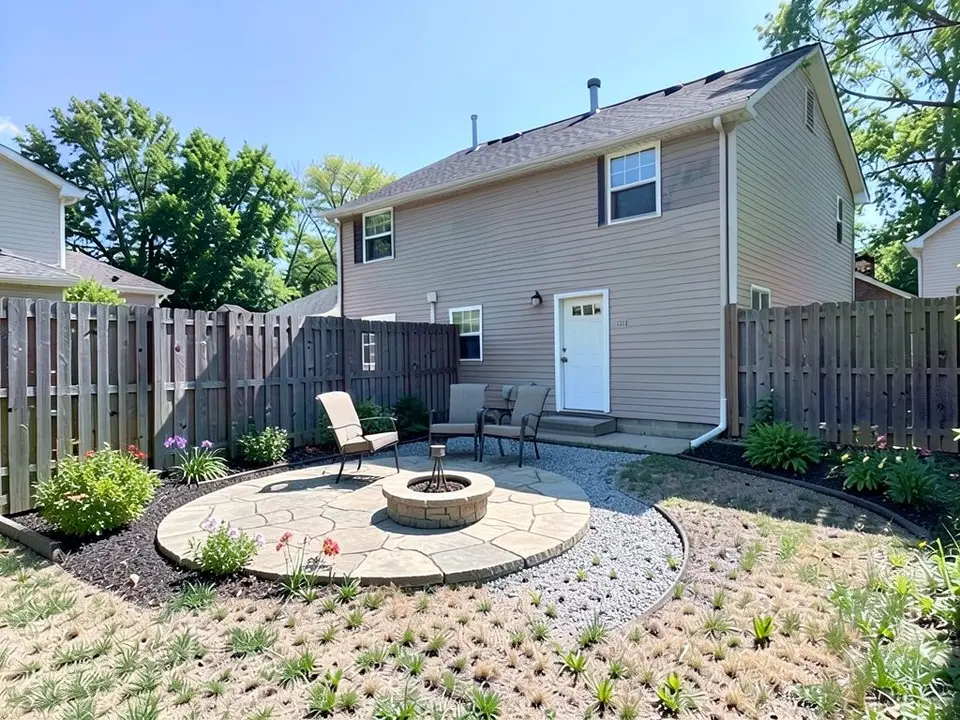
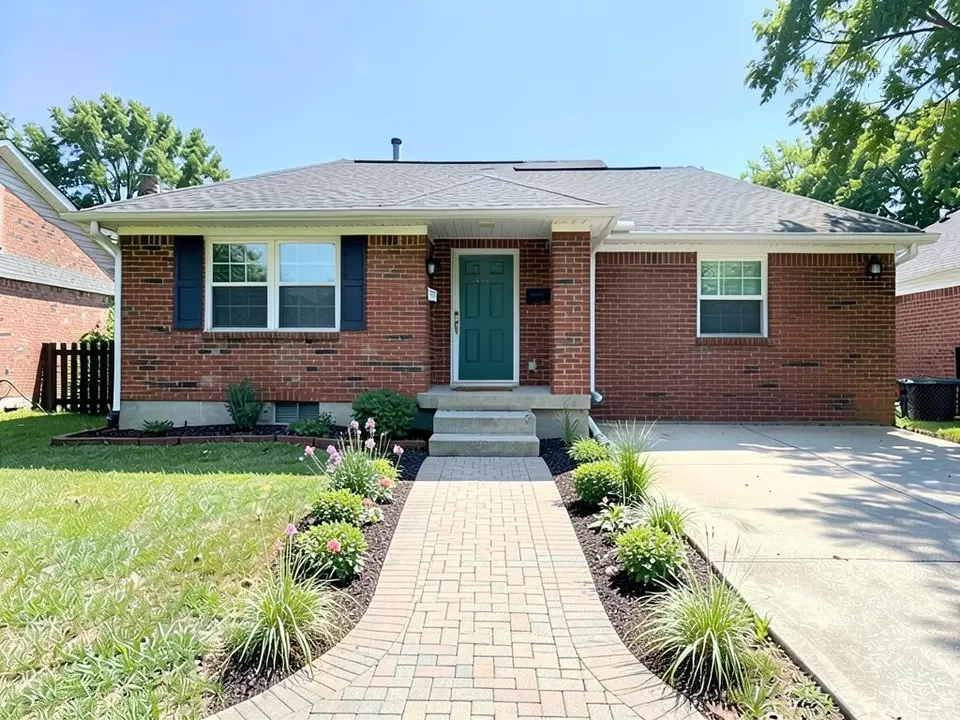
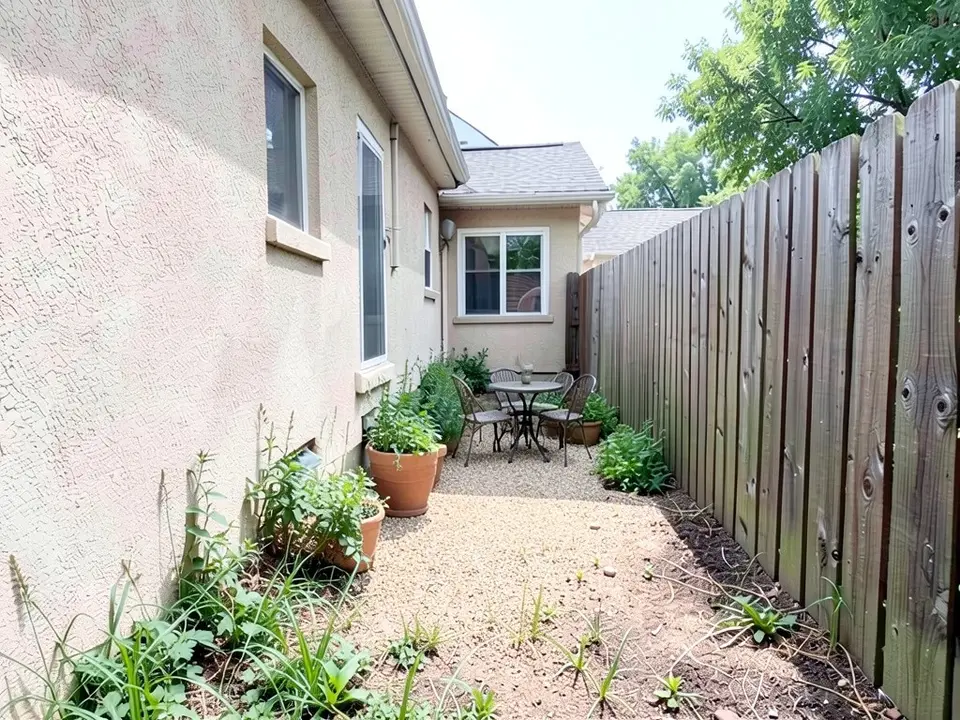
The AI shows a look: roughly how a patio, a walkway or planting beds could sit in your own photo. It does not always follow the instruction. In our examples it drew three chairs when we asked for four and more than the two we asked for in another, a patch of gravel instead of a path, and a nearly straight walkway instead of a curved one, and it left weeds in place and changed the driveway texture. Treat the result as a picture of an idea, not a plan, and get measurements, drainage and pricing from a professional.
Yard design instructions to paste into Custom mode
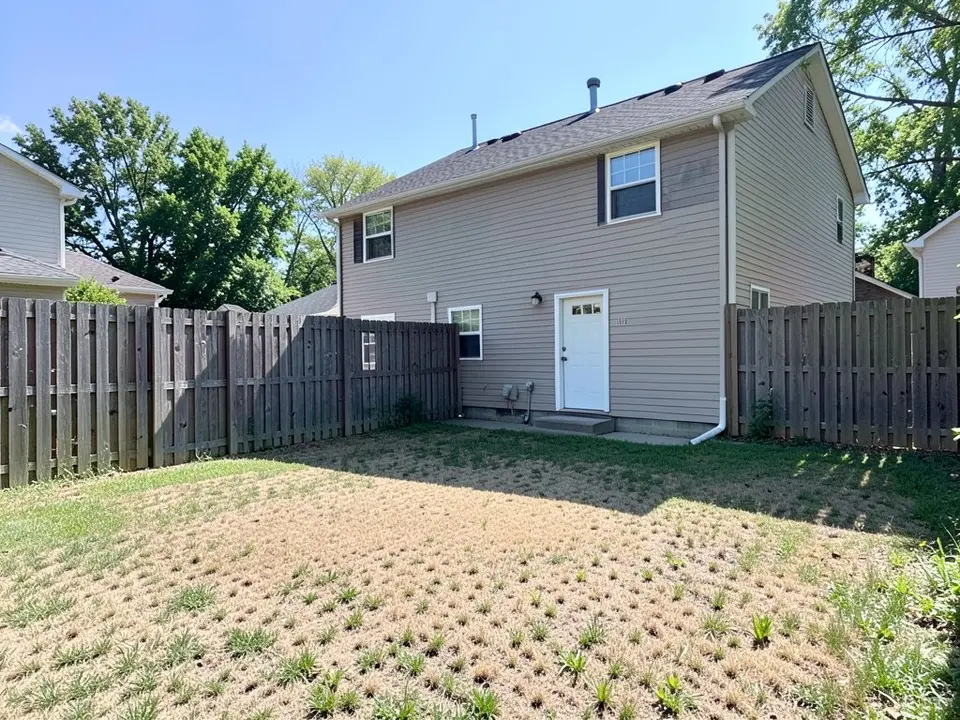
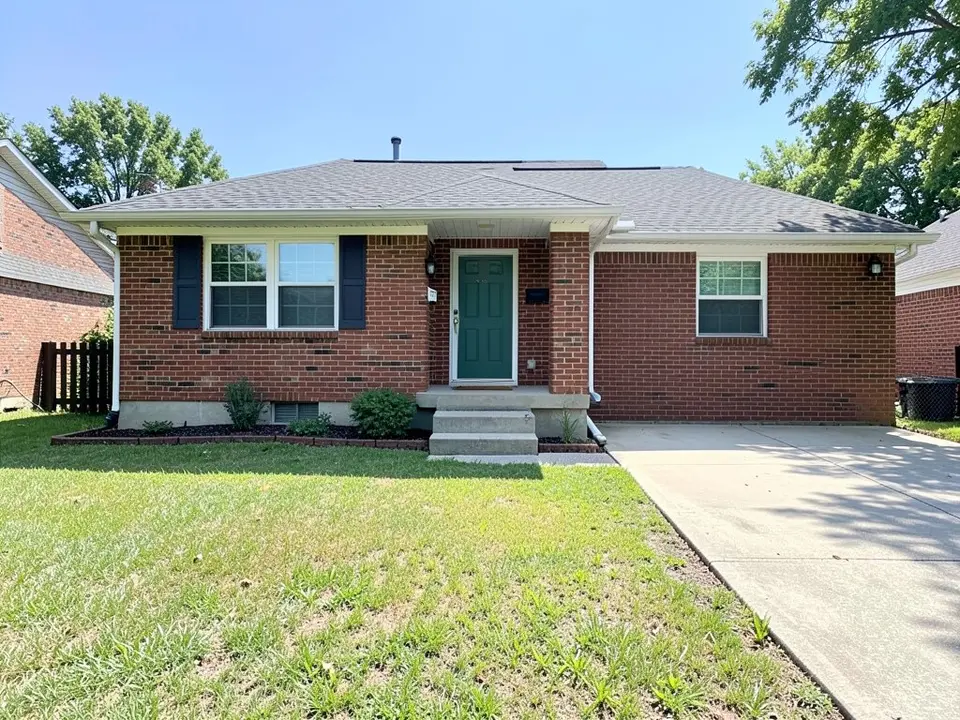
These are the exact instructions we used for the three examples above, in the same order. In the landscape tool, choose Custom, paste one into the Custom Design Requirements box, then upload your photo. Swap in your own features, materials, planting and what must stay.
- Change ONLY the yard: add a round stone patio with a small fire pit and four chairs near the house, a curved gravel path to the back, and planting beds with shrubs and flowers along the fence. Keep the house, the fence and the camera angle exactly the same.
- Change ONLY the front lawn: add a curved paver walkway from the driveway to the front door, and flowering planting beds with low shrubs and ornamental grasses on both sides of the walkway. Keep the house, the driveway and the camera angle exactly the same.
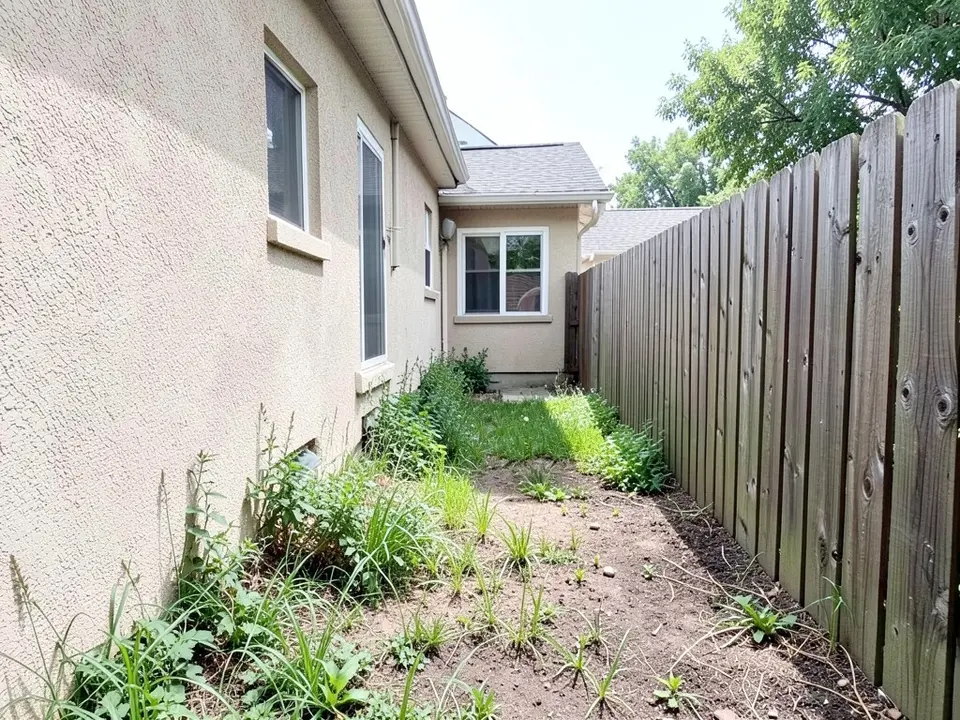
- Change ONLY the ground: replace the weedy grass with a decomposed granite path, add a small bistro table with two chairs at the far end, and add large pots with green plants along the house wall. Keep the house wall, the fence and the camera angle exactly the same.
Frequently asked questions
Is this affiliated with Yardzen?
No. aiforlandscape.com has no connection to Yardzen and is not endorsed by or sponsored by it. We compare the two using what Yardzen publishes on its own site.
How much does Yardzen cost?
Per yardzen.com on 2026-10-15: backyard packages at $995 (Essential), $1,395 (Classic) and $1,995 (Signature), and a Premium package at $3,495 for the whole property and exterior design. Yardzen's FAQ says extra revisions cost $295. Prices change, so check its site.
Is there a free Yardzen alternative?
Our tool is free to try: 1 free render with a free account, with a watermark. It is a different product, an AI picture of your own photo, not a designer's plan.
Does Yardzen build the design?
Yardzen's FAQ says it designs the space and then helps connect you with a local, vetted contractor, and its packages page says it helps you source bids in select markets. It also says you can use any builder.
Can an AI render replace a landscape designer?
Not for a full plan. The AI shows a look on your photo. It does not measure the yard, check drainage or local rules, price the work or produce drawings a contractor can build from, and it does not always follow the instruction. It is good for exploring ideas and for briefing a designer.
Do I need an account, and what does it cost?
You need an account, and it is free: 1 free render with a free account, and free renders carry a watermark. More renders and no watermark come with a paid plan. Weekly plans start at $6.99 per week as shown on our pricing page on 2026-10-15, and monthly and yearly plans are listed there too.
Sources
The facts above come from these pages, which we read in October 2026. We are not affiliated with any of them.