
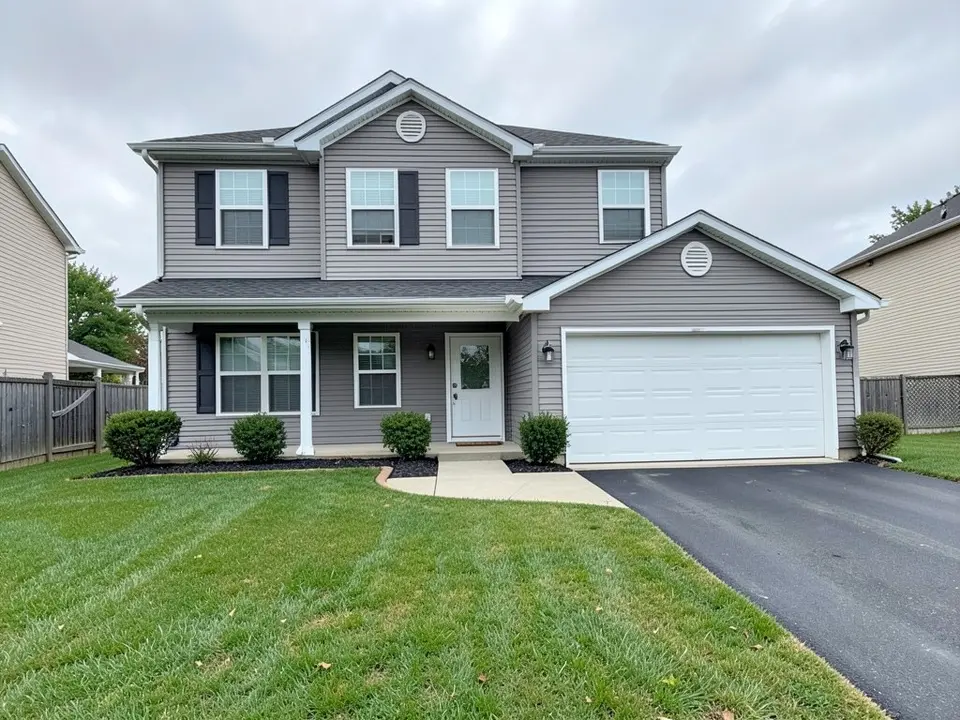
Start with how the yard will be used
These ideas come from LawnStarter (updated December 11, 2024), Real Homes (March 17, 2022), Planner 5D (March 18, 2024) and Livingetc. They are design advice, not tested in any climate, so check plants against your own growing zone.
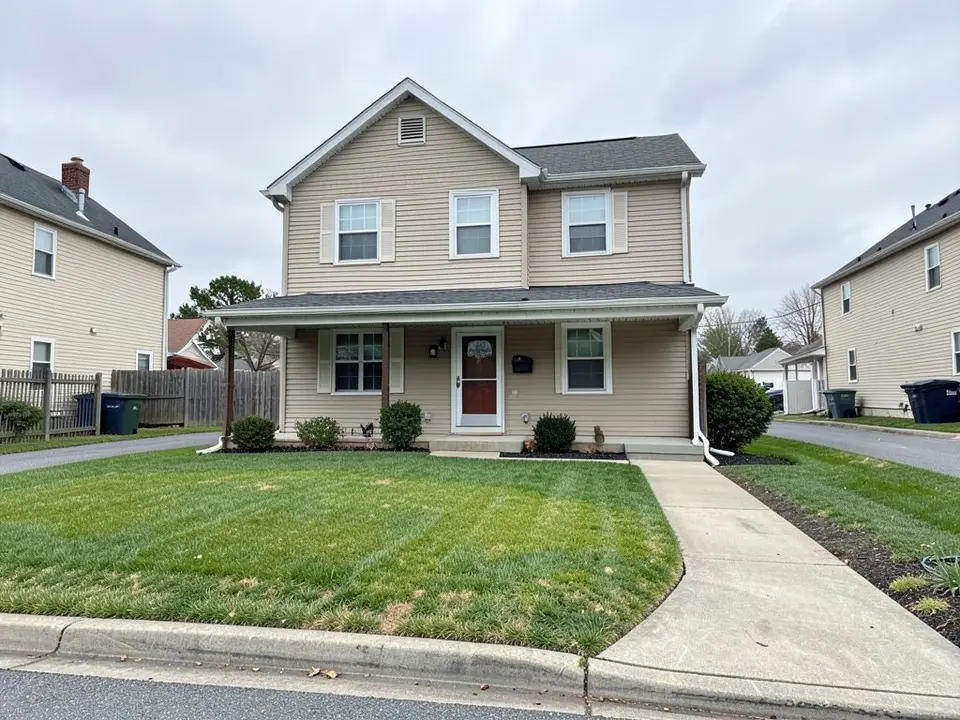
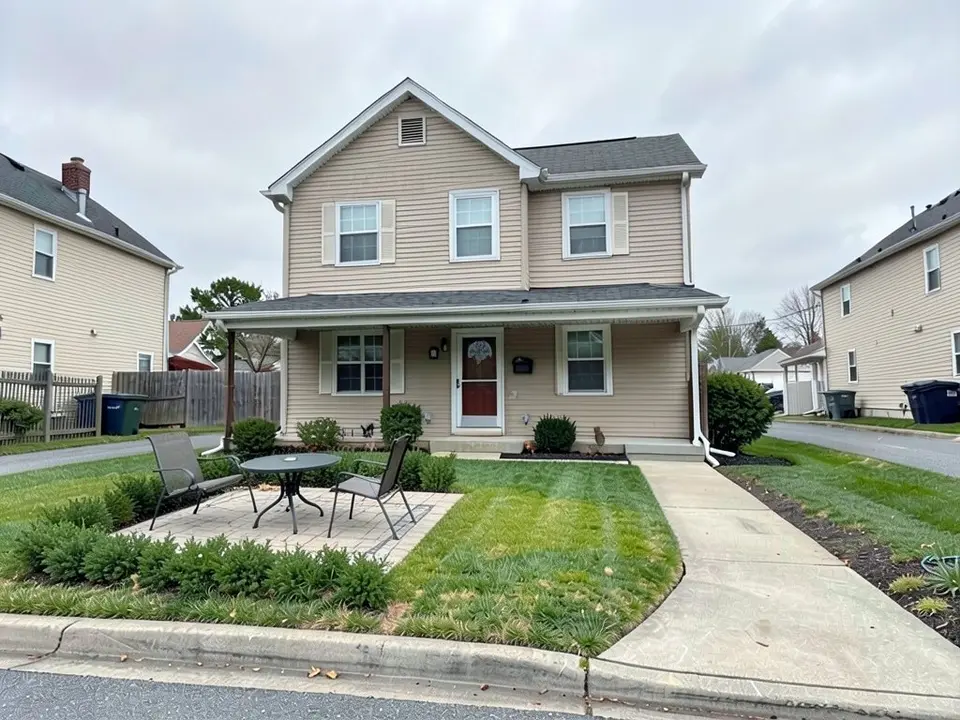
- Make it a place to sit: Real Homes suggests reclaiming the front yard for entertaining with a paved seating area under a shade structure, such as a timber slatted or metal fretwork design, with climbing plants added. That is our first example, without the shade structure.
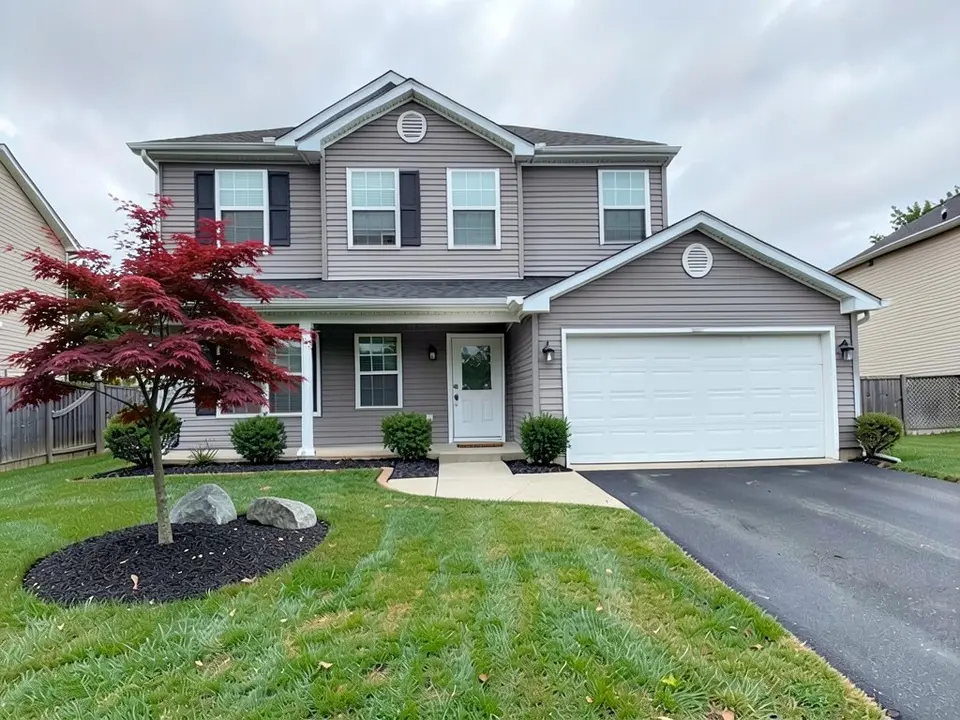
- Choose one big statement: Livingetc quotes designer John Wyer saying it is usually better to opt for one big design statement than scatter small pieces, because front yards are often small. Its example is a very large planter with a large Japanese maple.
- Match planting to the facade: Real Homes says a plain facade pairs well with small leaves and intricate plant shapes, and a textured facade pairs better with larger-leaved shrubs and trees.
Low walls, fences and gates
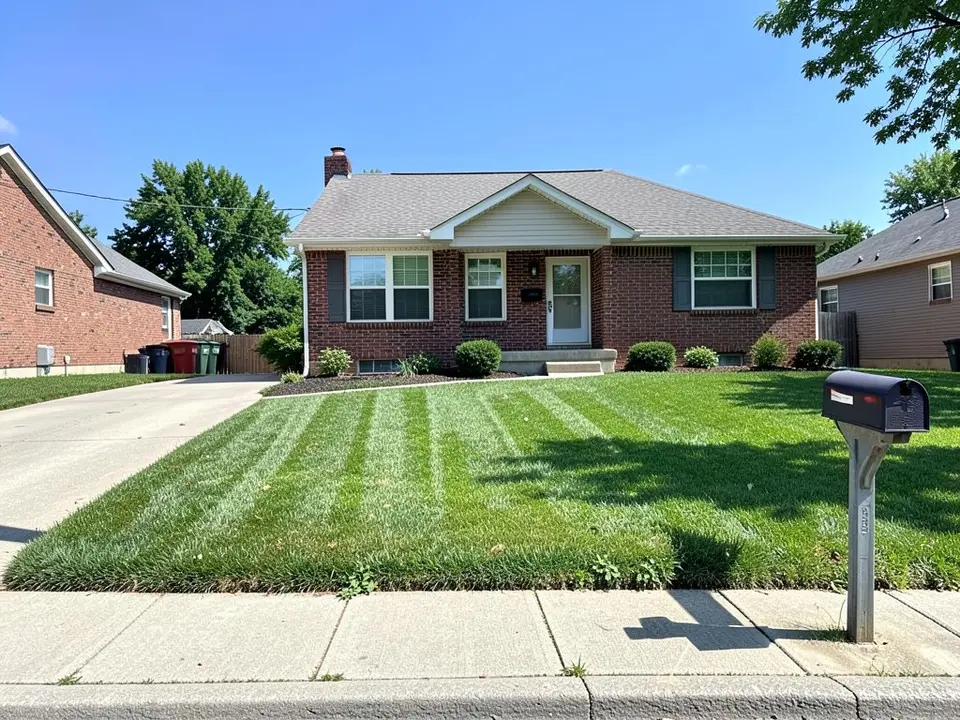
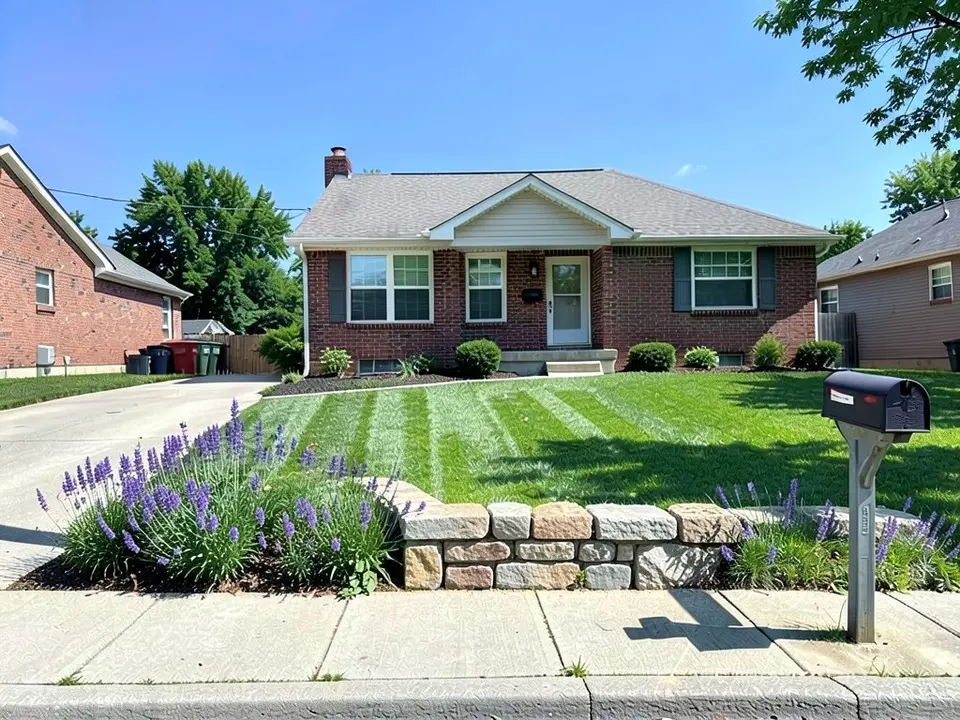
Our second example is the low wall idea.
- Low walls: Real Homes says low walls add privacy, and contrasting coping stones can double as seating, with discreet LED lighting under the lip, or low hedging as a cheaper alternative.
- Fences: LawnStarter lists picket, privacy and wrought iron fences as options for the front yard.
- A gate: Real Homes says the shape and style of a gate sets the tone for the property, so it should match the home's architecture.
- An arbor or trellis: LawnStarter says an arbor creates a focal point and draws visitors in, and a trellis near the door or fence can hold climbing roses, hydrangeas or ivy. Planner 5D suggests a wooden trellis with roses or wisteria for vertical space and privacy.
Trees and planting
Our third example is the tree idea. Flower beds have their own page: see our flower bed ideas.
- A tree as the centerpiece: LawnStarter says trees can be a centerpiece and that a shade garden, a bench or flower beds can go beneath them. Planner 5D suggests flowering trees such as redbud, crabapple or kousa dogwood for color with little upkeep.
- Check the tree's size first: Livingetc says to check a tree's mature height and width and how fast it grows so it does not overwhelm the space, and says multi-stem trees such as shapely maples suit small spaces because you can see through them.
- Layered greenery: Planner 5D suggests taller plants at the back, medium bushes in the middle, and low flowers or ground covers at the front.
- Perennials and evergreens: Planner 5D says perennials such as phlox, black-eyed Susans and lavender return each year and need less care than annuals. Real Homes suggests mostly evergreen planting for a neat look all year, and says to pick hedging that suits your soil, aspect and local temperature extremes.
- Mulch: LawnStarter says mulch adds color and texture, controls weeds, helps hold moisture and needs little upkeep.
Paths, steps, lighting and water
The pages agree that how you reach the door matters as much as the planting.
- Entry walk width: Real Homes says a front entry walk about six to eight feet wide lets two people walk side by side. For walkway ideas see our front walkway landscaping ideas.
- Paths through the yard: LawnStarter says paved paths of stone, brick, concrete or pavers direct foot traffic away from the lawn and plants and reduce mowing. Planner 5D suggests a winding stone path for a natural walkway.
- Lighting: LawnStarter says lights make the yard visible at night and highlight architecture, trees and beds. See our landscape lighting design ideas.
- A water feature: LawnStarter lists fountains, waterfalls, streams and water gardens. Planner 5D suggests a fountain or pond for a calm atmosphere.
- A sloped front yard: LawnStarter says retaining walls control erosion and make slopes usable, and stairs make hillside areas accessible and safer after rain. Planner 5D suggests small retaining walls with tiered plant beds.
If you want less lawn
LawnStarter says rock gardens are low-maintenance and drought-tolerant and suit hot, dry sites, and that heavy boulders may need professional help. Planner 5D suggests gravel or crushed stone to help keep weeds down and improve drainage, planting beds around large rocks, and conifers or junipers to keep the yard green year-round. For dry climates see our desert landscaping ideas and xeriscape front yard design pages.
What these pages do not cover
None of the pages give rules for how close a wall, fence or tree may stand to the sidewalk, the street or a utility line, and none cover permits. Those rules differ by city, so ask your city or county before you build or plant, and treat our pictures as the look only.
How to try an idea on your own front yard photo
Use Custom mode for this. The Yard Redesign styles have no text box, so you cannot ask for a particular seating area, wall or tree there. Custom lets you name the spot, the feature and what must stay the same.
- Take the photo in daylight from the street or the sidewalk, with the house and the lawn in frame.
- Open the landscape tool and sign in with Google or an email code. You get 1 free render with a free account.
- Under Select Landscape Mode, pick Custom.
- In the Custom Design Requirements box, name the part of the yard you want changed, what to put there, and what must stay the same, such as the house, the door, the driveway and the camera angle. Say where, for example the far left of the lawn, away from the front door.
- Upload your photo under Upload Your Garden Image and click Generate Custom Design.
- Compare the result with your photo and change one thing at a time, such as the position or the plants, and run it again.
What the AI can and cannot do
The AI shows a look: roughly how a seating area, a wall or a tree would sit in your own front yard. That helps you choose and explain what you want to a landscaper.
It does not measure the yard, check setbacks or utility lines, pick plants for your climate, size a tree for its mature height, or price the job. It also does not always follow the instruction, as the position of the flowers, the tree height and the first tree placed in front of the door show. Treat the result as a picture of an idea and get the plan from a local professional.
Front yard instructions to paste into Custom mode
These are the exact instructions we used for the three examples above, in the same order. In the landscape tool, choose Custom, paste one into the Custom Design Requirements box, then upload your photo. Swap in your own feature, the part of the yard you want changed and what must stay.
- Change ONLY the left half of the front lawn: replace it with a small square paver seating area with two chairs and a small round table, edged by low green shrubs. Keep the house, the front door, the walkway, the rest of the lawn, the sidewalk and the camera angle exactly the same.
- Change ONLY the edge of the lawn along the sidewalk: add a low natural fieldstone wall about knee high with a row of purple flowers and green plants behind it. Keep the house, the driveway, the mailbox, the lawn and the camera angle exactly the same.
- Change ONLY the far left of the lawn, well away from the front door: add one Japanese maple tree with red leaves with a round ring of dark mulch around its base and two grey boulders beside it. Keep the house, the front door, the garage door, the path, the shrubs, the driveway, the rest of the lawn and the camera angle exactly the same.
Frequently asked questions
What are good front yard landscaping ideas?
The pages we read suggest a paved seating area, a low wall or open fence, a single tree or large planter as a focal point, layered planting, a walk wide enough for two, lighting and a water feature. The examples above show a seating area, a low wall and a tree on a photo.
How big can I let a tree get?
Livingetc says to check a tree's mature height and width and its growth rate before planting. A picture has no scale for that, and our example tree is drawn nearly as tall as the second floor. Ask a local nursery.
Can your tool tell me how far a wall or tree must be from the sidewalk?
No. None of the pages we read give a setback rule, and a picture cannot check one. Rules differ by city, so ask your city or county.
Why did you re-run the tree example?
Our first instruction named only the middle of the lawn and the model drew the tree directly in front of the front door. Naming the far left of the lawn, away from the door, fixed that. Say where in your own instruction.
Is this the same as your small front yard page?
No. This page is general ideas for any front yard. For tight spaces see our small front yard landscaping ideas.
Do I need an account, and is it free?
You need an account, and it is free: 1 free render with a free account, and free renders carry a watermark. More renders and no watermark come with a paid plan.
Sources
The facts above come from these pages, which we read in October 2026. We are not affiliated with any of them.
- LawnStarter: 17 landscaping ideas for your front yard (Jane Purnell, updated December 11, 2024)
- Real Homes: 16 vibrant front yard landscaping ideas to make your home stand out (March 17, 2022)
- Planner 5D: 25 front yard landscaping ideas (March 18, 2024)
- Livingetc: front yard landscaping ideas (we read the first five of its twelve ideas)