
What landscape lighting is for
Wikipedia describes landscape lighting as outdoor illumination of private gardens and public landscapes for safety, nighttime aesthetics, accessibility, security, recreation and social uses. The same article says light pollution is made worse by excessive, misdirected or obtrusive use of light, so where you aim matters as much as how many fixtures you buy.
The Homes & Gardens guide (Sarah Wilson, 2022) says it is not a case of having as many lights outside as possible: decide what you want to illuminate and how, because soft, well-positioned lighting can focus on a few key elements. It adds that a little light goes a long way because your eyes need less light outdoors to see light, shadow and pattern.
Landscape lighting ideas by area
These are the techniques MOD Lighting (a lighting retailer, so it sells these fixtures) and Homes & Gardens describe. Each is a look you can try on your photo first.
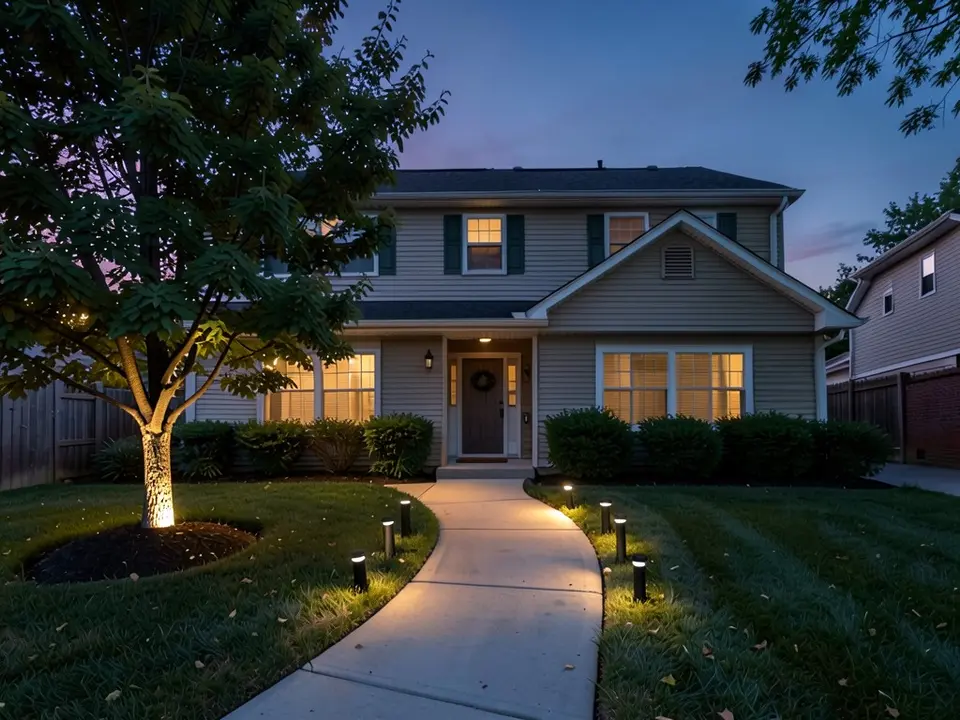
- Walkway and path lights: MOD Lighting says path lights spaced evenly along walkways give calm general light, that a warm glow improves safety and curb appeal, and that curved path lighting can follow the line of the walkway. Our first example shows path lights along a curved walk.
- The front door: MOD Lighting suggests wall lights on either side of the door for balanced light that defines the entry, with even spacing so the light is inviting rather than harsh. It also suggests soft layered light on the porch instead of bright overhead light.
- Trees: MOD Lighting says uplighting tall trees with narrower beams at the base of the trunk draws the eye upward and creates shadows that add depth. Homes & Gardens notes that spike uplights let you light a multi-stem tree all the way around.
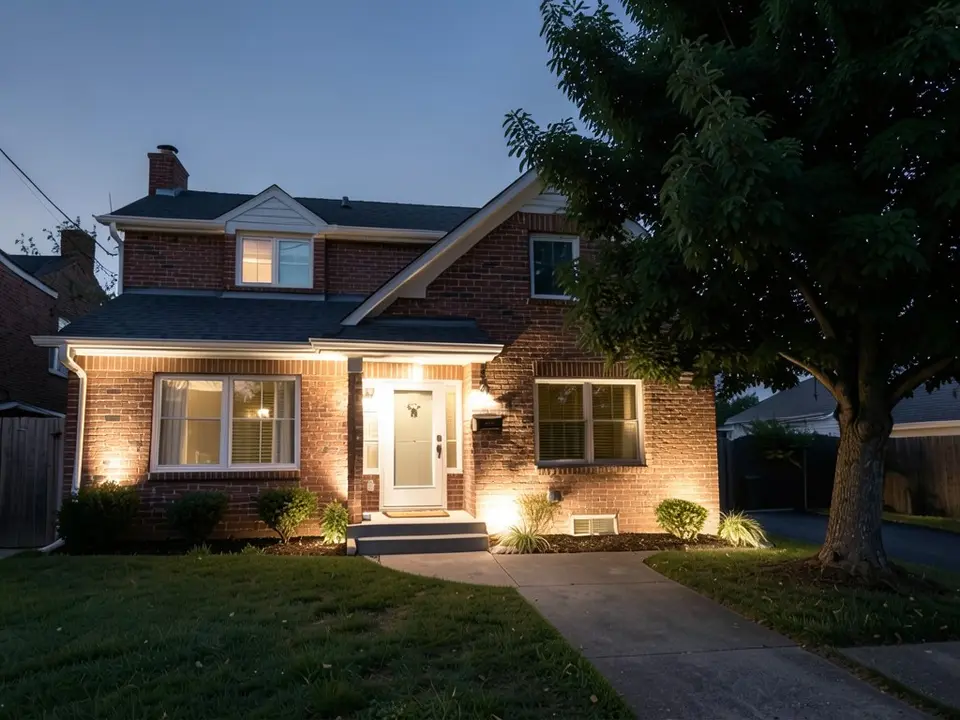
- Walls and brick: MOD Lighting says wide-beam wash lights light an exterior wall softly and bring out texture such as brick or stone, and that grazing light on brick and stone adds depth. Our third example washes a brick wall.
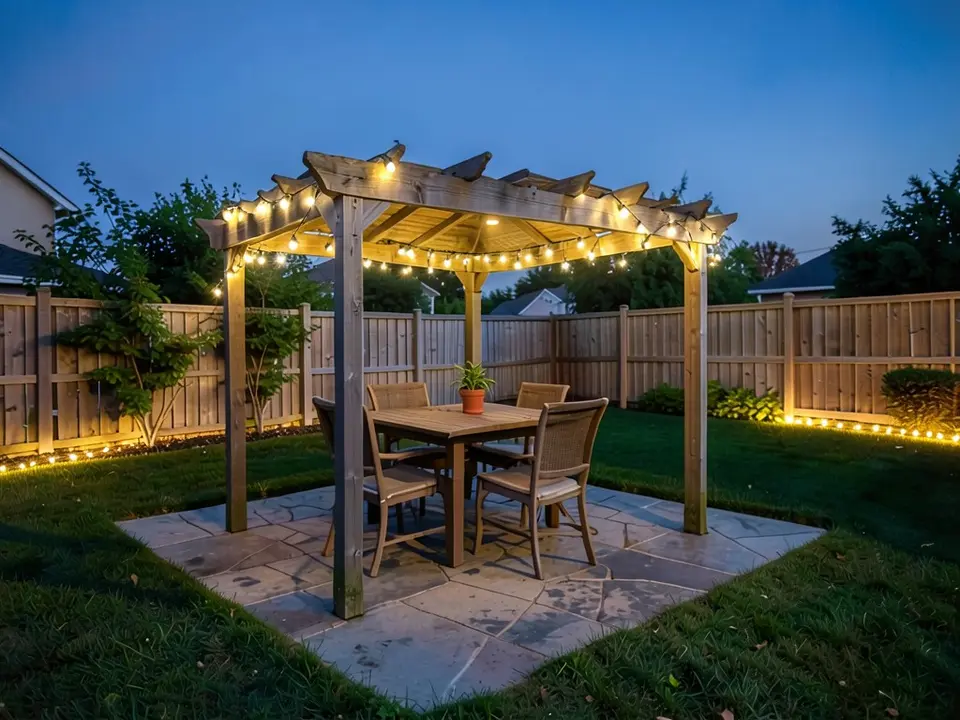
- Patios, pergolas and decks: Homes & Gardens says a pergola or gazebo becomes a focal point at night when a mix of internal and external lights is used, and suggests layering light sources at different heights, with festoon lights overhead and staked pathway lights near the ground. Deck lighting should be subtler, since deck is a softer material than stone. Our second example uses string lights.
- Steps and level changes: MOD Lighting says step lights give focused light on stairs and level changes near the door and improve safety. Homes & Gardens notes low-level step lighting keeps steps easy to use in the evening.
- Plants and flower beds: Homes & Gardens says uplights, recessed into the ground or on movable spikes, suit plants with strong forms, and that their light diffuses up through lower foliage rather than casting halos into the sky. MOD Lighting suggests accent lights in flower beds to show seasonal planting after dark.
- Security and motion sensors: MOD Lighting suggests motion sensor lights near garages, side paths and other dark access points so they switch on only when needed. Wikipedia lists motion sensors and light sensors (photocells) among the controls a system can use.
How to layer a lighting plan
MOD Lighting says a layered plan combines accent, pathway and architectural lighting so no area is too bright or too dark. Homes & Gardens adds practical order: walk the garden at night to see where you need light, start with areas that need lighting for safety, then add detail, usually on separate circuits so you can switch them independently. If you have different zones in the garden, it suggests a different lighting solution for each.
Homes & Gardens also says it is easier to add lights than to take them away, so start modestly.
Fixtures and power, as the sources describe them
Wikipedia lists the kinds of fixture and control a system can include. Check what suits your yard with a local lighting professional.
- Fixture types: Path lights, area lights, stake-mounted uplights and floodlights, wall lights, tree-mounted down lights, deck lights, well lights set below grade, in-ground uplights flush with the surface, step lights recessed into risers, and string lights.
- Voltage: Wikipedia says fixtures are either line voltage (120 V in the US, 240 V in Europe) or low voltage (12 V in the US), and that systems can use transformers, timers and photocell or motion switching.
- Solar and LED: Wikipedia says LEDs, solar power, low-voltage fixtures and energy-saving design are increasingly used.
- Wiring and permits: Wikipedia says the power connection to the property is determined by code and permit, and that wiring is run underground per code. Homes & Gardens recommends the best fittings you can afford and having electric lights installed by a qualified electrician. It also advises avoiding cheap painted-metal fittings outdoors, which can deteriorate quickly.
How not to overdo it
Homes & Gardens says flooding a backyard with bright light from above creates a harsh effect that can also bother neighbouring properties, and that keeping areas of shadow makes the lit parts stand out. Wikipedia's note on excessive and misdirected light points the same way: aim fixtures at what you want to show and away from the sky and the neighbours. Try it on a photo first, then judge whether it feels like a few well-chosen glows or a yard full of bulbs.
How to try lighting on your own photo
Use Custom mode. The Yard Redesign styles have no text box, so you cannot name a fixture or a position there. Custom lets you name the lights, where they go and what must stay the same.
- Take the photo at dusk or after dark, from where you usually see the house or patio, with the house, the paths and the trees in frame. A dusk photo lets the AI add light without having to change the time of day.
- Open the landscape tool and sign in with Google or an email code. You get 1 free render with a free account.
- Under Select Landscape Mode, pick Custom.
- In the Custom Design Requirements box, describe the lights, where they go and how warm they should be, and say what must stay the same, such as the house, the walkway and the plants. Asking for soft light with no glare helped in our third example.
- Upload your photo under Upload Your Garden Image and click Generate Custom Design.
- Compare the result with your photo, change one thing at a time, such as the number of lights, and run it again.
What the AI can and cannot do
The AI shows a look: roughly where light would fall in your own photo and how warm it would feel. That helps you decide where to light, and gives an installer something to react to.
It does not choose fixtures or beam angles, count how many you need, check spacing, voltage or wiring, or tell you whether the result would be too bright for your neighbours. It also does not always follow the instruction, as the seven path lights, the unlit tree and the extra glow in our examples show. Treat the result as a picture of an idea, and get a plan from a lighting professional or a qualified electrician.
Lighting instructions to paste into Custom mode
These are the exact instructions we used for the three examples above, in the same order. In the landscape tool, choose Custom, paste one into the Custom Design Requirements box, then upload your photo. Swap in your own fixtures, where they go, how warm and what must stay.
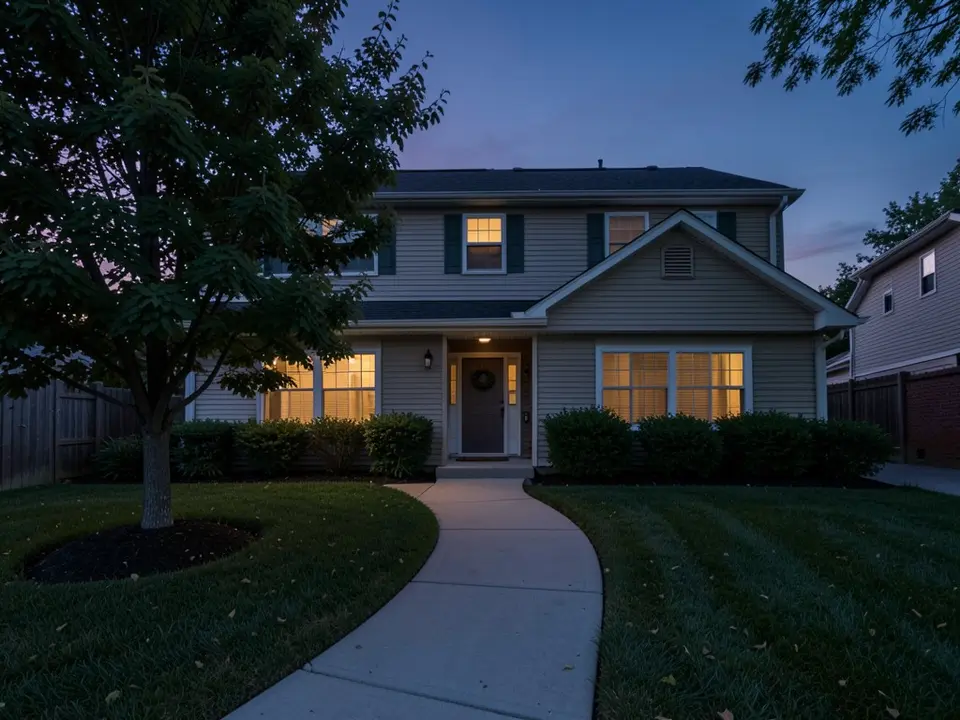
- Change ONLY the lighting: add six small black path lights with a warm white glow along both sides of the walkway, and one warm white uplight at the base of the tree lighting up its trunk and leaves. Keep the house, the walkway, the plants and the camera angle exactly the same.
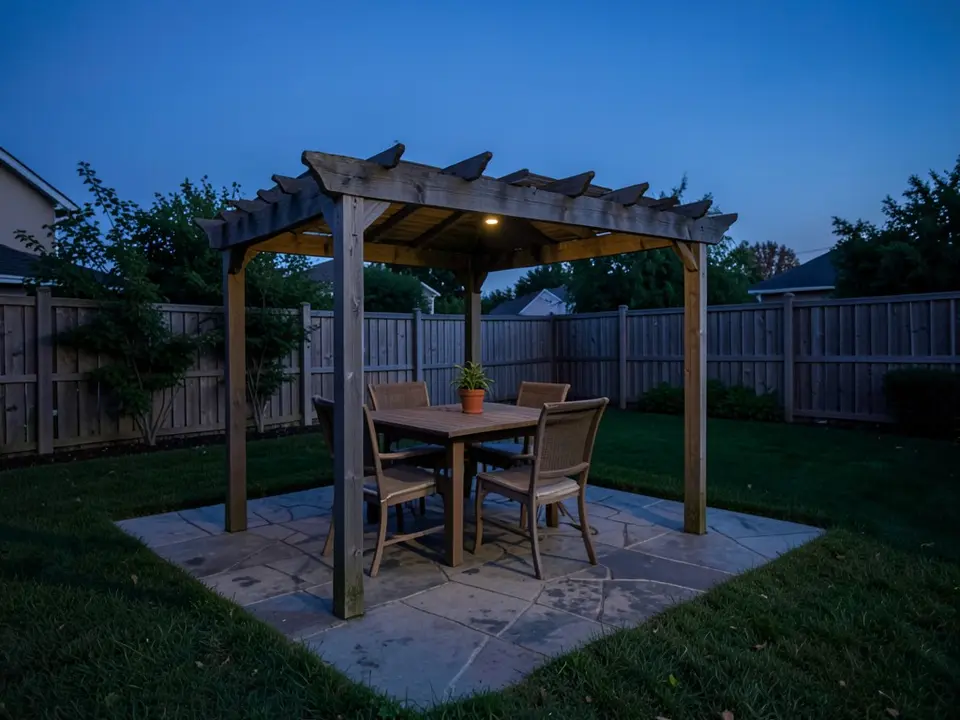
- Change ONLY the lighting: hang warm white string lights along the top beams of the pergola and add warm white lights glowing along the base of the fence. Keep the pergola, the table, the chairs, the patio, the lawn and the camera angle exactly the same.
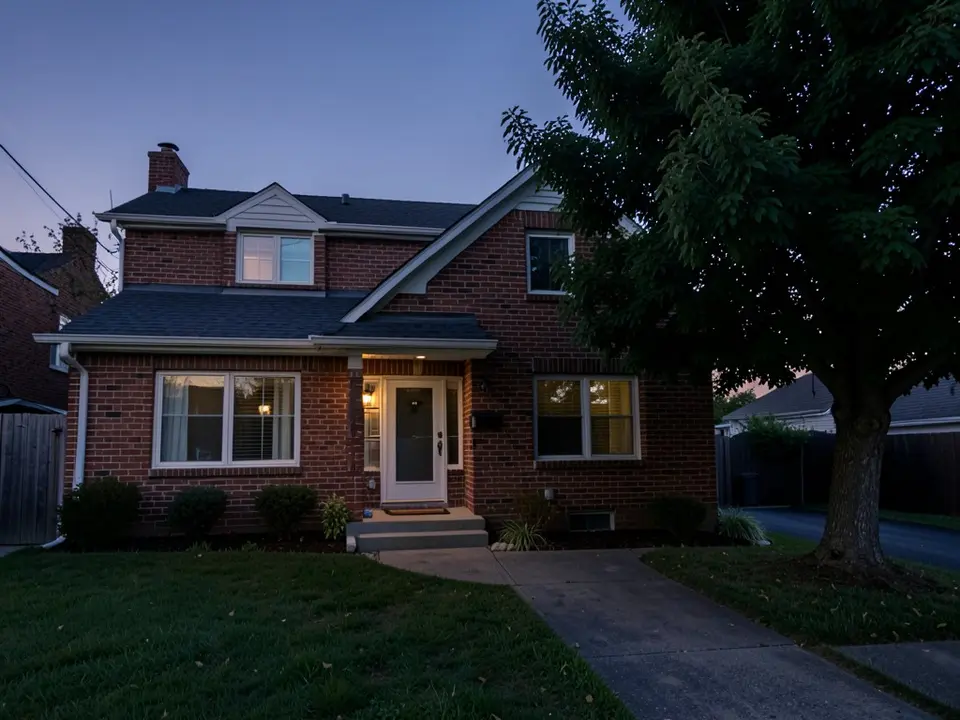
- Change ONLY the lighting: add soft warm white lights that gently shine up the brick wall on both sides of the front door, and a soft warm uplight at the base of the large tree trunk. No glare, no light beams, no lens flare. Keep the house, the tree, the lawn, the walkway and the camera angle exactly the same.
Frequently asked questions
What is landscape lighting design?
Wikipedia describes landscape lighting as the outdoor illumination of gardens and landscapes for safety, nighttime aesthetics, accessibility, security, recreation and social use. A design decides which features to light, with which fixtures and where, and how the lights are controlled.
Where should I start with landscape lighting?
Homes & Gardens suggests walking the garden at night to see where you need light, starting with areas that need lighting for safety, such as paths and entries, and then adding detail, usually on separate circuits so you can switch them independently.
How many lights do I need?
The sources do not give a number, because it depends on the yard. Homes & Gardens says a little light goes a long way outdoors and that it is easier to add lights than to take them away. A lighting professional can size and space a system for your property.
Is low-voltage or solar landscape lighting better?
Wikipedia lists both as common: low-voltage (12 V in the US) systems with a transformer, and solar fixtures, alongside line-voltage fixtures. Which suits you depends on the yard and the look you want, so ask a local lighting professional.
Can I install landscape lights myself?
Wikipedia says the connection to the property's power is determined by code and permit, and Homes & Gardens recommends having electric lights installed by a qualified electrician. Check local rules before you start.
Can the AI design the lighting for my yard?
No. It draws the look you describe on your photo. It does not choose fixtures, count lights, check spacing or voltage, and it does not always follow the instruction, as the captions above show. It is a way to compare ideas before you talk to an installer.
Do I need an account, and is it free?
You need an account, and it is free: 1 free render with a free account, and free renders carry a watermark. More renders and no watermark come with a paid plan.
Sources
The facts above come from these pages, which we read in October 2026. We are not affiliated with any of them.