Free Landscape Design Software: 9 Tools and Apps Compared

Landscape design software ranges from a free drag-and-drop garden planner to paid 3D programs made for landscape professionals. Most of the tools people search for have some free option, but what "free" means differs: some are free for good, some are free with fewer features, and some are only a trial.

1 free render with a free account (sign in with Google or an email code). More renders come with a paid plan (see pricing).

Below: the four kinds of landscape design software and who each one suits, a table of 9 tools with what is free, what they run on and what the paid version costs, a short review of each, three examples of a photo-based design, and how to choose. The tool on this site is one of the 9, and we say where the others do things it cannot. Prices and free terms are as each tool's own website showed them on November 9, 2026.

Which kind of landscape design software do you need?

Landscape design programs fall into four kinds. Pick the kind first, then the tool, because a garden planner and a 3D modeler answer different questions.

  • 2D layout planners: You draw the yard from above and drop in beds, paths, trees and a patio. Good for working out where things go. GARDENA myGarden and Planner 5D's 2D view work this way.
  • 3D modelers: You build the yard and the house in 3D and walk around them. More work to learn, but you get a plan with real measurements. SketchUp, DreamPlan and Realtime Landscaping are in this group.
  • Plant and bed planners: Made for choosing and spacing plants, often vegetables, in beds. GrowVeg and Garden Planner are examples.
  • Photo-based design: You start from a photo of your own yard and see a new design drawn on it. iScape lets you place plants and objects on the photo yourself; the AI tool on this site redraws the whole photo from a style or a written instruction. Fast for seeing a look, but you get a picture, not a measured plan.

Free landscape design software compared

What each tool's own website said about its free option, platforms and price on November 9, 2026. Prices change, so check the tool's site before you pay.

ToolKindRuns onWhat is freePaid version (official site)
AI landscape tool (this site)Photo-based AIWeb browser, also on phones1 free render with a free account; free renders carry a watermarkFrom $6.99 a week, with monthly and yearly plans
iScapePhoto-based, place objects yourselfiOS and Android (2D/3D design on iOS only)Free to download and try, with limited featuresPro $29.99 a month or $299.99 a year
Planner 5D2D and 3D home and yard plannerWeb, iOS, Android, Windows, macOSFree plan with half of the furniture and object catalogPremium 59.99 a year or 19.99 a month
SketchUp Free3D modelerWeb browserFree web version, not for commercial useGo $10.75 a month, billed yearly; Pro and Studio cost more
GARDENA myGarden2D garden plannerOnlineFreeNo paid version
DreamPlan2D and 3D home, deck and garden designWindows, macOSFree version for non-commercial use, no signupPrice not shown on the pages we read
Garden Planner2D plan with a 3D viewWindows, MacFree trial, no signup$38 one-time (marked on sale)
GrowVegVegetable and bed plannerWeb browser on any device7-day free trial, no payment details$35 a year (auto-renew)
Realtime Landscaping3D landscape plans, for homeowners to professionalsWindows 10 and 11 (64-bit)Trial only: fewer plants and objects, watermark on printoutsPlus $149, Pro $279, Architect $599, one-time

The 9 landscape design tools, one by one

The AI landscape tool on this site

Upload a photo of your front yard, backyard or garden, then pick a Yard Redesign style or choose Custom and type what you want, such as "a curved bed of lavender along the fence and a gravel path". The AI redraws the same photo with the change. The three examples further down show what it does well and where it misses.

Free: 1 free render with a free account (sign in with Google or an email code); free renders carry a watermark. Paid plans start at $6.99 a week and remove the watermark. It works in a phone browser, so there is nothing to install.

Limits: you get a picture, not a plan. It does not measure the yard, list plants or count materials, and it does not know your climate or soil.

iScape

A phone app that also works from a photo of your yard, but you place the plants, pavers and objects on it yourself, and it has an augmented reality view. iScape's site says it has nearly 4 million users. Its own blog suggests it for photo-based planning, Planner 5D for beginners on a budget, Realtime for complex yards and SketchUp for detailed DIY plans.

Free: "Free to Download & Trial", with limited features. Paid: Pro at $29.99 a month or $299.99 a year. iOS and Android, but the pricing page says 2D/3D design is on iOS only.

Planner 5D

A home and interior planner with a landscape mode: draw the yard in 2D, then view it in 3D. Its landscape page invites you to start a landscape plan for free.

Free: a $0 plan with access to 50% of the furniture catalog. Paid: Premium listed at 59.99 a year or 19.99 a month (the pricing page shows euros; its FAQ shows dollars). Runs in the browser and on iOS, Android, Windows and macOS.

SketchUp Free

A general 3D modeling program, not made only for gardens, so it takes longer to learn. In return you can model the house, a deck, steps and slopes to real sizes.

Free: the web version, which SketchUp says is not for commercial use and does not need a subscription. Paid: the Go plan at $10.75 a month, billed yearly, with Pro and Studio plans above it.

GARDENA myGarden

A free online garden planner from Gardena, a garden tool and watering brand. You lay out the garden from above, and it can also plan a sprinkler system with Gardena's parts. A quick way to sketch a layout without paying or installing anything.

DreamPlan

Home design software from NCH that covers decks and gardens as well as rooms, with 2D and 3D views. NCH says a free version is available for non-commercial use with no signup. It runs on Windows 7 to 11 and on macOS. We could not find the paid price on the pages we read.

Garden Planner

A desktop program for Windows and Mac: draw the garden in 2D with plant and object symbols, then look at it in 3D. Free trial with no signup or subscription; the full version was listed at $38 one-time, marked on sale.

GrowVeg

A garden planner made mainly for vegetable and kitchen gardens: you draw beds and it helps space the crops. It runs in a web browser on any device. Free for 7 days with no payment details needed, then $35 a year on auto-renew, or $50 for 1 year and $85 for 2 years.

Realtime Landscaping

Full landscape design software for Windows 10 and 11 (64-bit), with plans, 3D views and walk-throughs. Top Ten Reviews named it best overall. The top version, Architect, is sold as software for landscape professionals.

Free: a trial that is fully working but has only a small number of plants and objects and puts a watermark on movies and printouts. Paid: Plus $149, Pro $279, Architect $599, one-time with no subscription.
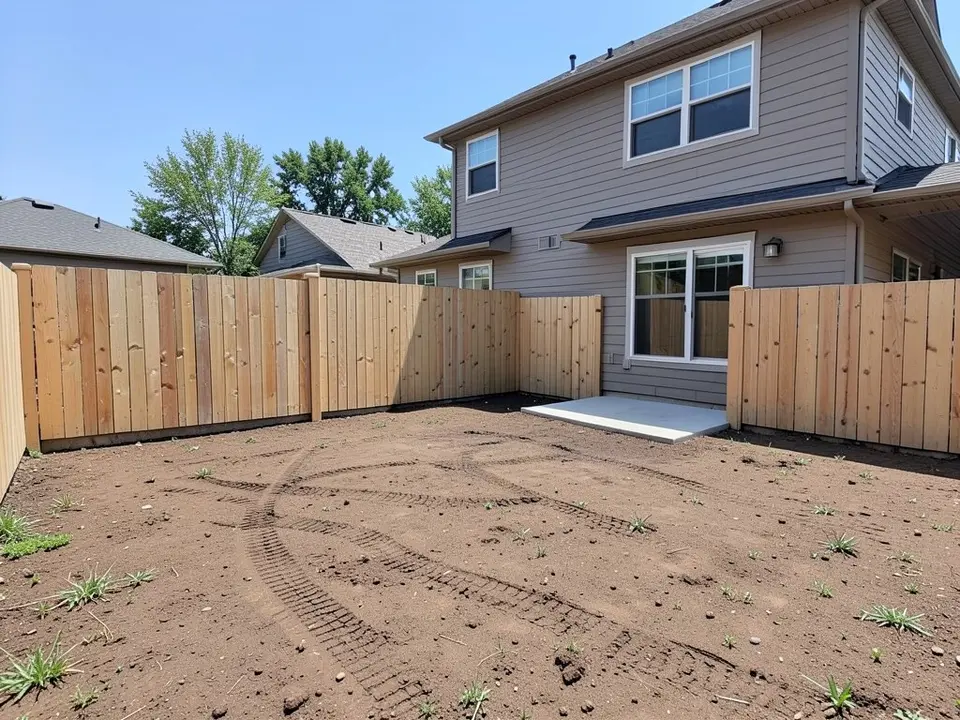
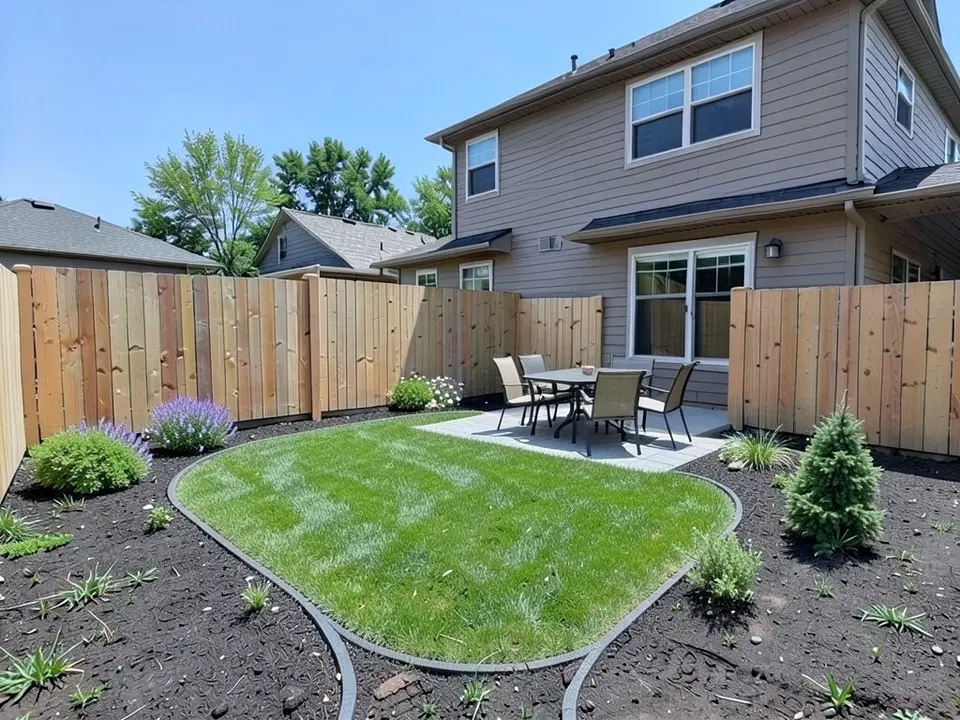
What a photo-based AI landscape design looks like

Three before and after pairs. In each, the left image was generated by AI as a stand-in for an ordinary yard, and the right image is that same picture edited by AI from a written instruction. These are not photos of real customer homes. We made them with our own AI model, which is not one of the models you can pick in the landscape tool, so a render in the tool may look different. We made each pair once and show it as it came out, including what it got wrong.

1. A bare new-build backyard to a finished yard

AI-generated example: the empty backyard of a new two-story house with flat brown dirt, tire tracks and a few weeds, a new light wooden fence and a small concrete slab by the sliding door

Before

AI-edited version of the same image: a curved lawn in the middle, a grey paver patio with a table and four chairs by the sliding door, and dark mulch beds with a few shrubs and flowers along the fence

After

A bare new-build backyard (first instruction below). The before image is an AI-drawn stand-in for a new backyard, not a customer photo. Already in the before: the two-story house, the sliding door, the new wooden fence, the small concrete slab and the dirt with tire tracks. What followed the instruction: a lawn in the middle with a steel edge, a grey paver patio by the door with a table and four chairs, and curved mulch beds along the fence. What did not: the beds are mostly bare mulch with only a few shrubs, lavender and white flowers, weeds still poke through the mulch, and the one tree is a small evergreen, not the ornamental tree we asked for. The house and fence look the same. Both images were made with our own AI model.

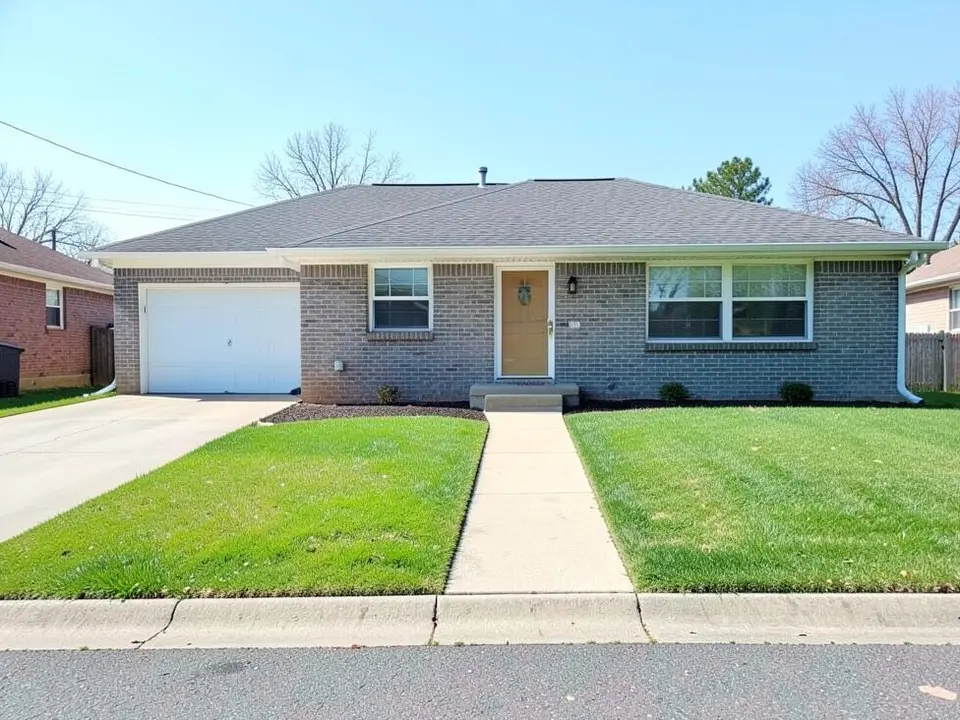
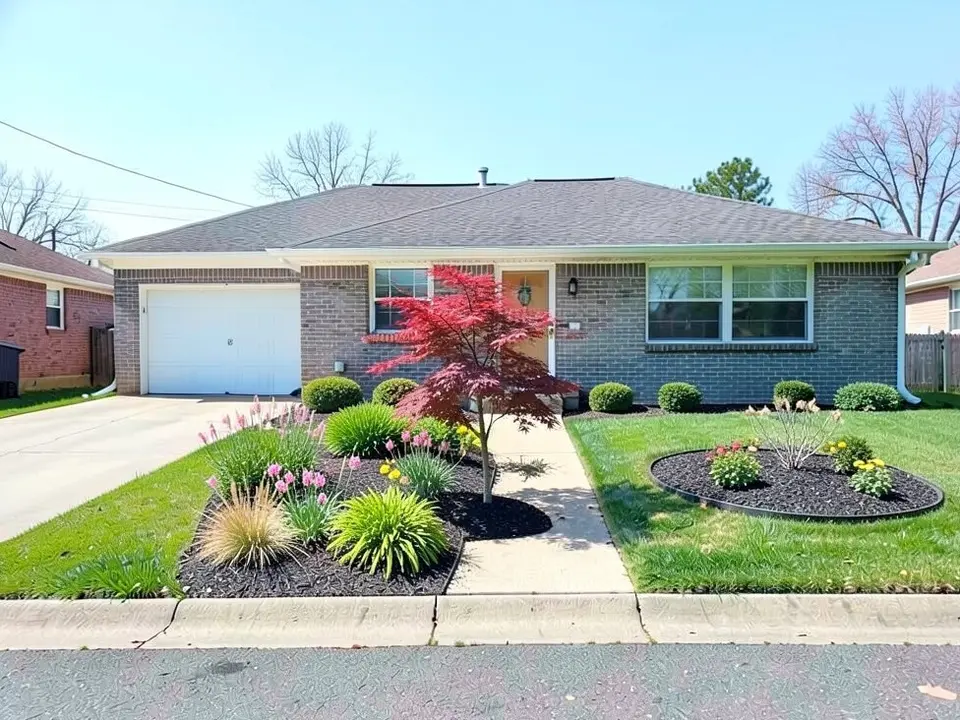
2. Beds and a tree on a plain front lawn

AI-generated example: a grey brick ranch house with a white garage door, a flat green front lawn on both sides of a straight concrete walk, a driveway on the left and no flower beds

Before

AI-edited version of the same image: a red Japanese maple by the front walk, a mulch bed of grasses and pink and yellow flowers beside the walk, round shrubs along the house and a round flower bed in the lawn on the right

After

A plain front lawn (second instruction below). The before image is an AI-drawn stand-in for an ordinary ranch house, not a customer photo. Already in the before: the grey brick house, the garage, the front door, the straight walk, the driveway and the flat lawn. What followed the instruction: dark mulch beds with ornamental grasses and pink and yellow flowers, low round shrubs along the house, and a red maple. What did not: we asked for the maple in the middle of the lawn, and the AI put it beside the walk, where it hides part of the front door and a window; the round bed in the lawn on the right has flowers but no tree, and the bed along the house is a row of shrubs rather than one wide curved bed. Both images were made with our own AI model.

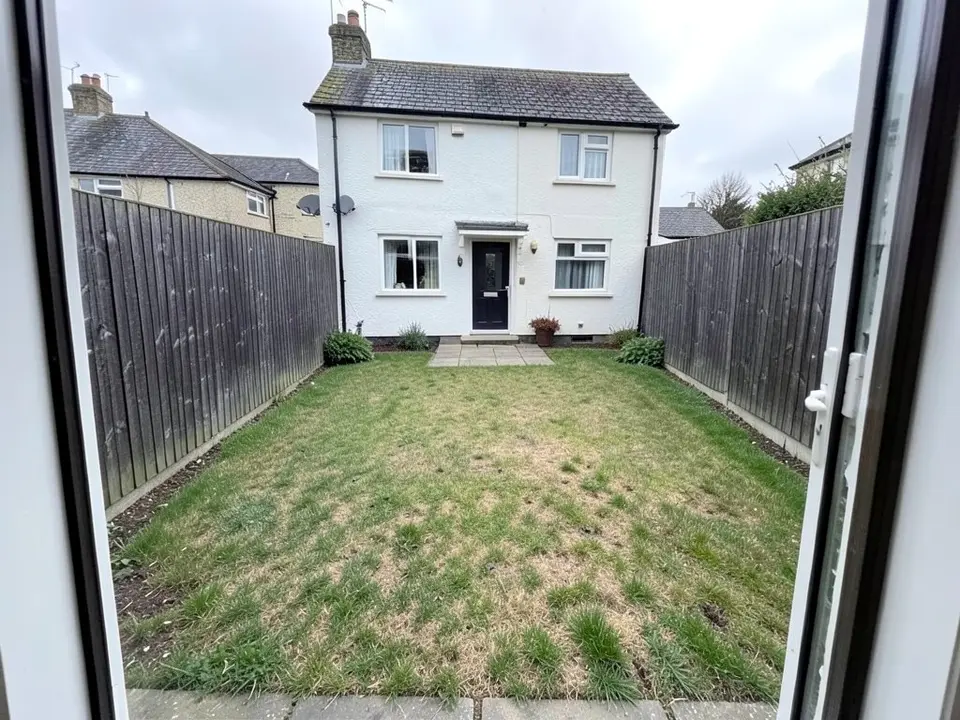
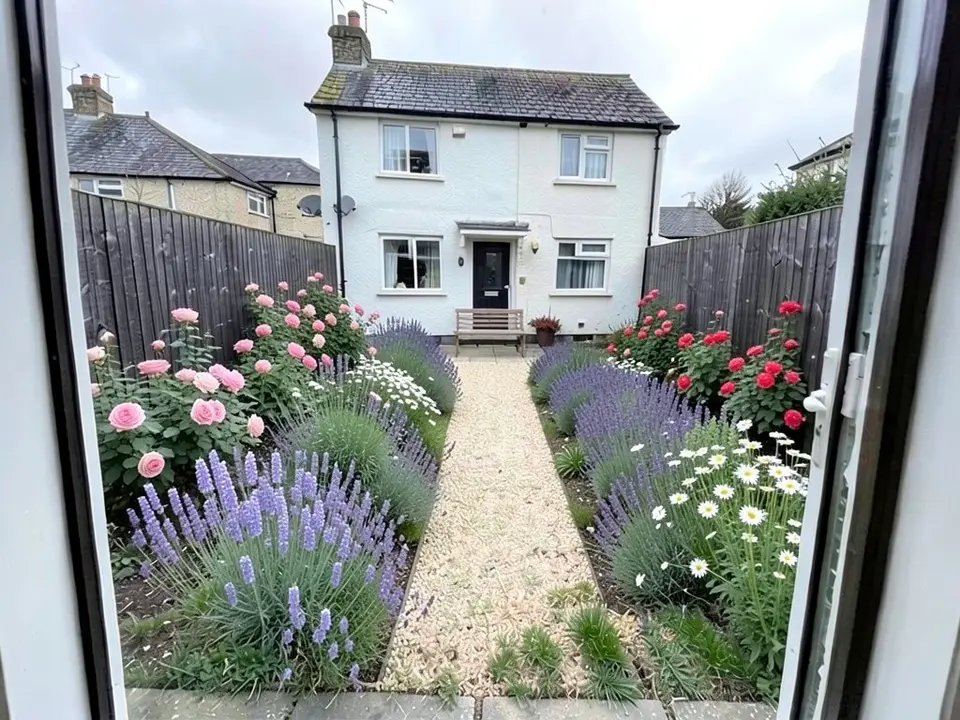
3. A worn lawn to a small cottage garden

AI-generated example: a small square back garden seen from an open back door, with a worn patchy lawn, tall dark wooden fences on both sides and a white rendered house at the far end

Before

AI-edited version of the same image: wide borders of pink and red roses, lavender and white daisies along both fences, a pale gravel path down the middle and a small wooden bench at the far end

After

A small English back garden (third instruction below). The before image is an AI-drawn stand-in, not a customer photo. Already in the before: the view from the back door, the tall dark fences, the paving at both ends and the white house at the far end. What followed the instruction: the lawn is gone under wide borders of roses, lavender and daisies along both fences, with a pale gravel path down the middle. What did not: we could not pick out any foxgloves, and the bench stands on the paving at the far end by the house rather than against a fence. Both images were made with our own AI model.

How to choose landscape design software

  1. Decide what you need at the end: a picture to agree on a look, a measured plan to build from, or a planting list. That picks the kind of software.
  2. Check what it runs on. Realtime Landscaping is Windows only; SketchUp Free, GrowVeg, GARDENA myGarden and the tool on this site run in a browser; iScape and Planner 5D have phone apps.
  3. Check what "free" means: free for good (GARDENA myGarden, SketchUp Free and DreamPlan for non-commercial use), a free plan with fewer features (Planner 5D, iScape), a limited free start (1 free render here) or a trial (GrowVeg, Garden Planner, Realtime).
  4. Measure the yard before you draw. A plan is only as good as the sizes you put in.
  5. Use two kinds together if you need to: a photo-based tool to choose the look, then a planner or a landscaper to turn it into a plan.

Landscape design instructions to paste into Custom mode

These are the exact instructions we used for the three examples above, in the same order. In the landscape tool, choose Custom, paste one into the Custom Design Requirements box, then upload a photo of your yard. Swap in your own plants, the spot and what must stay.

  1. Change ONLY the bare dirt: turn it into a finished backyard with a lawn of green grass in the middle, a grey paver patio extending the concrete slab with a table and four chairs, curved planting beds of dark mulch with shrubs and purple and white flowers along the fence, and one small ornamental tree in the far bed. Keep the house, the sliding door, the fence, the sky and the camera angle exactly the same.
  2. Change ONLY the lawn: add a wide curved planting bed along the front of the house with dark mulch, low rounded green shrubs, ornamental grasses and pink and yellow flowers, and a second round bed with a small red maple tree in the middle of the lawn. Keep the rest of the lawn, the house, the front door, the walk, the driveway, the sky and the camera angle exactly the same.
  3. Change ONLY the lawn: replace it with a cottage-style garden of wide planting borders along all three fences filled with roses, lavender, foxgloves and daisies, a narrow winding path of pale gravel through the middle to a small wooden bench at the back fence. Keep the fences, the paved area, the sky and the camera angle exactly the same.

Landscape design software questions

What is the best free landscape design software?

It depends on what you need. For a quick free layout, GARDENA myGarden or Planner 5D's free plan; for a measured 3D model, SketchUp Free or DreamPlan (both free for non-commercial use); for seeing a design on a photo of your own yard, iScape or the AI tool on this site. Realtime Landscaping is the most complete of the list, but its free version is a trial.

Is there landscape design software that is completely free?

Yes. GARDENA myGarden is a free online planner, SketchUp Free and DreamPlan have free versions for non-commercial use, and Planner 5D has a $0 plan with half of its catalog. iScape and the tool on this site give a limited free start, and GrowVeg, Garden Planner and Realtime Landscaping offer free trials.

What is the best landscape design app for a phone?

iScape and Planner 5D have iOS and Android apps, though iScape's pricing page says 2D/3D design is on iOS only. The AI tool on this site needs no app: open it in your phone's browser and upload a photo of your yard.

Can I design my yard from a photo?

Yes, with photo-based software. iScape lets you place plants and objects on your photo yourself. The AI tool on this site redraws the whole photo from a style or a written instruction, as in the three examples above. You get a picture of the look, not a measured plan.

Which landscape design software works on a Mac?

Planner 5D, DreamPlan and Garden Planner have Mac versions, and SketchUp Free, GrowVeg, GARDENA myGarden and the tool on this site run in a browser. Realtime Landscaping runs on Windows only.

Is the AI landscape tool on this site free?

You need an account, and it is free: 1 free render with a free account, and free renders carry a watermark. Paid plans start at $6.99 a week, with monthly and yearly plans, and remove the watermark.

Do I still need a landscaper if I use landscape design software?

For a big project, usually yes. Software helps you decide what you want and explain it, but it does not check drainage, soil, slopes, utilities or local rules. Bring your picture or plan to a landscaper or a garden center and let them check it.

Where the prices and free terms come from

More landscape design guides

If your photo is dark or soft, run it through the AI photo enhancer first, then bring it back here. The exterior design tool covers the house itself. You can read more about who builds these tools on our about page.

For more, browse all of our landscaping ideas, sorted into front yards, backyards, patios, gardens, pools, styles and regions.